
Subtotal:
$0.00
Best Cell Phone Charging Lockers in California: Buyer’s Guide for Los Angeles, San Francisco & U.S. Businesses
A practical, no-hype procurement guide for hotels, venues, event organizers, universities, retailers, and facilities teams evaluating secure phone charging equipment.
Cell Phone Charging Lockers for Los Angeles, San Francisco & California Businesses.
Cell Phone Charging Lockers | California Buyer’s Guide
Powerful Cell Phone Charging Station Introduction
Every venue operator has watched the same scene play out: a guest’s phone drops below 10%, and for the next twenty minutes their attention goes entirely to finding an outlet, not to the venue, the event, or the purchase they were about to make. Smartphones have become the primary tool people use to navigate, pay, communicate, and document their experience — which means a dead battery isn’t a minor inconvenience anymore. It’s a disruption to the visit itself.
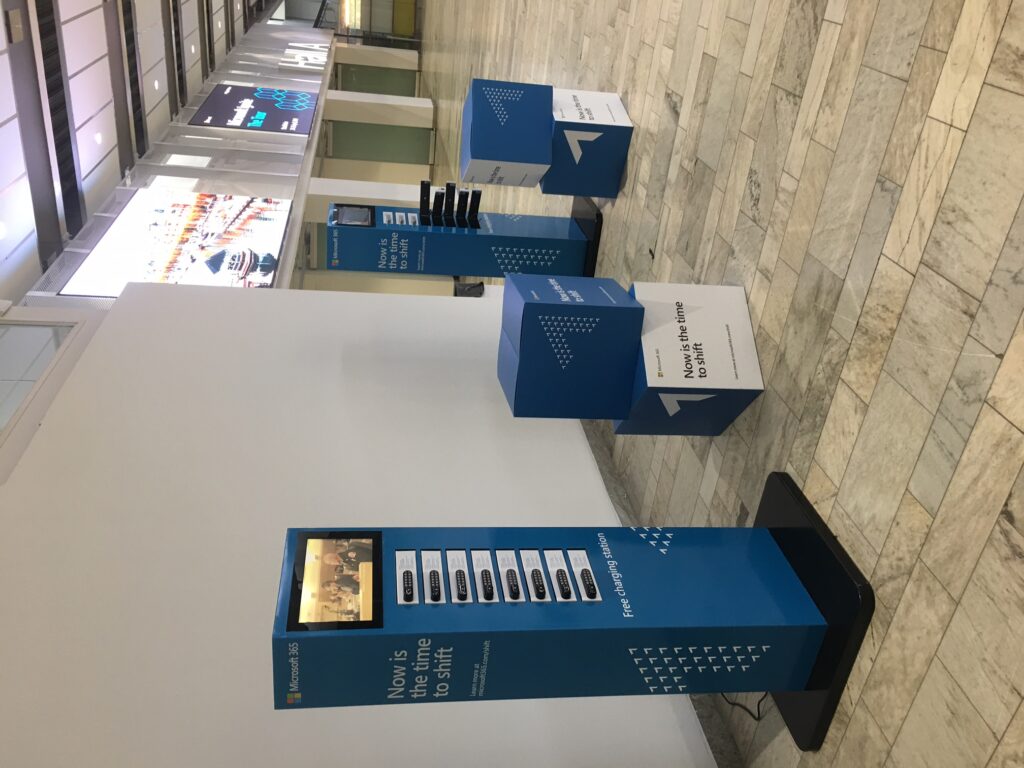
Businesses have responded in different ways. Some install a few extra wall outlets near seating areas. Some hand out portable battery packs. Others invest in dedicated charging furniture — stations, kiosks, towers, and lockers built specifically for public and commercial charging. Of these, charging lockers have become the preferred option for venues that need to charge multiple devices at once, want the guest’s phone to be physically secure while it’s out of their hands, and want a piece of equipment that also reinforces their brand.
There’s an important distinction buyers need to understand early: an open charging station (a table or wall unit with exposed cables) and a charging locker (individual, lockable compartments) solve overlapping but different problems. An open station is cheaper and faster to use for a quick top-up. A locker adds a layer of physical security — the user’s phone is out of sight and behind a lock, not sitting on a countertop where it could be picked up, swapped, or simply walked off with. For venues with longer dwell times, higher foot traffic, higher-value clientele, or any real risk of theft (bars, airports, conference halls, pool decks, gyms), that security difference is usually the deciding factor.
This guide is written for the buyer, not the marketer. It covers how charging lockers work, how to figure out how many you need, what digital PIN locks actually do and don’t protect against, what questions to ask a supplier before signing anything, and how the market looks specifically in California, Los Angeles, and San Francisco — three of the highest-traffic commercial and event markets in the country. Where it’s relevant, it also covers a specific product, the Vischarge 12-Locker Cell Phone Charging Station, using only claims that Vischarge currently publishes and states clearly which of those are permanent specifications versus time-limited promotions you should confirm before ordering.
If you’re currently comparing quotes or trying to figure out whether a 12-locker unit is the right size for your location, you can skip ahead to the locker-count section or request a quote directly at any point.

Cell phone charging lockers with digital pin code lock
Section 1 — What Is a Cell Phone Charging Locker?
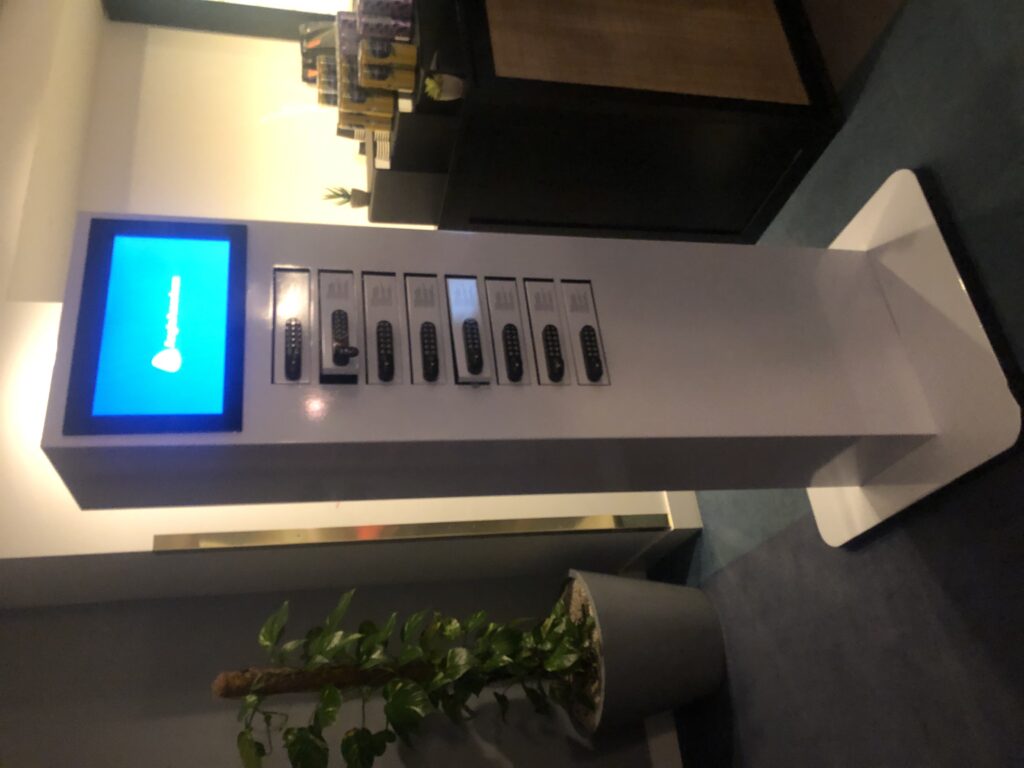
A cell phone charging locker is a piece of commercial furniture containing individual, lockable compartments, each wired with charging cables, that allows a visitor to secure and charge a phone or other small device without staying with it. Unlike an open charging station, where cables are exposed and the phone sits in view of anyone walking past, a locker closes and locks around the device, and the user sets or receives a code, key, or card to reopen it later.
How a charging locker actually works
From the user’s side, the process is simple:
- Open an empty, unlocked compartment (usually indicated by a light or an “open” label).
- Place the phone inside and connect it to the cable already installed in that compartment.
- Close the door and set an access code on the keypad (or scan an RFID card, or take a physical key, depending on the model).
- Walk away. The phone charges unattended.
- Return, enter the same code (or present the card/key), and retrieve the device.
From the operator’s side, there’s usually a second layer: an administrator or master code that can override any individual locker in case a user forgets their code, leaves without retrieving the phone, or a locker needs to be reset between events.
Charging + storage, not just charging
The core value proposition of a locker versus a plain charging cable is that it solves two problems at once — a drained battery and an unattended device. That combination matters most in environments where people don’t want to (or can’t) stand next to their phone while it charges: a wedding reception, a trade show floor, a gym, a bar, a hotel lobby, or a pool deck.
Charging locker vs. related equipment: a comparison table
| Equipment Type | Physical Security | Typical Capacity | Best For | Downsides |
|---|---|---|---|---|
| Charging locker | High — individual locked compartment per user | Usually 4–24 devices | Bars, events, gyms, transit hubs, malls, anywhere theft risk or long dwell time exists | Higher upfront cost than open stations; takes more floor space |
| Open charging station / kiosk | None — cables exposed, phone visible | Usually 4–10 cables | Quick top-ups in low-risk, staffed, or visible areas (offices, waiting rooms) | No security; devices vulnerable to theft or tampering |
| Charging tower / cabinet | Varies — some towers include individual bays | 6–20+ | High-density placement, conference centers | Similar tradeoffs to lockers or open stations depending on design |
| Charging wall | None to low | Varies, built into wall/furniture | Architectural integration, lounges | Fixed installation, less portable |
| Wireless charging station (pad/table) | None | 1 device per pad | Cafes, restaurant tables, waiting areas | Slower charging, requires phone to sit still, not all phones support wireless charging without a case removed |
The right choice depends primarily on dwell time and theft risk at your specific location — both covered in more detail in Section 3.
Ready to compare options for your venue? Request a Free Quote and a specialist can walk through locker count and configuration with you.
Section 2 — Why Businesses Are Buying Phone Charging Lockers
The business case for charging infrastructure generally comes down to a handful of recurring drivers. None of these guarantee a specific financial return — that depends entirely on your traffic, your venue type, and how you use the equipment — but they explain why adoption has grown across hospitality, retail, events, and education.
- Visitor convenience and dwell time. A charged phone is table stakes for a modern visit — for navigation, payment, ride-hailing, and photos. Removing “my phone is dead” as a reason to leave early is a reasonable, if unquantifiable, benefit.
- Device security. Especially in bars, gyms, pool decks, and crowded events, an unattended phone on an open charging cable is a theft target. A locked compartment removes that specific risk (though not all risk — see Section 19).
- Employee and staff convenience. Break rooms, back-of-house areas, and staff lounges benefit from the same logic as public-facing units.
- Event attendee satisfaction. Conferences and trade shows in particular generate heavy phone use (photos, networking apps, digital badges) and correspondingly heavy battery drain.
- Brand exposure and sponsorship. A branded charging locker is a visible, dwell-time asset — people stand near it, often for several minutes, which creates a natural advertising or sponsorship placement (see Section 15 and Section 23).
- Reduced dependence on ad hoc outlet use. Guests improvising with lobby outlets, sitting on the floor near a wall socket, or asking staff to charge a phone behind the counter are all situations a dedicated unit removes.
- Professional appearance. A well-designed, branded unit reads as an amenity, not a stopgap — similar to how a venue treats coat check or a business center.
How to think about ROI without fabricated numbers
There’s no universal “charging lockers increase revenue by X%” statistic that applies across industries, and any guide that states one without a named, dated source should be treated with skepticism. What a buyer can reasonably estimate is:
- Cost avoidance: fewer complaints, fewer early departures attributable to a dead phone, less staff time spent lending chargers or babysitting phones behind a counter.
- Sponsorship or advertising revenue, if you sell branding space on the unit to a partner or use it as your own marketing surface.
- Guest satisfaction proxies — if you already survey guests (NPS, post-event surveys, hotel review scores), you can add a charging-specific question and track it before/after installation.
A more detailed framework for estimating payback period is in Section 29.

Cell phone charging lockers
Section 3 — Cell Phone Charging Lockers vs. Open Charging Kiosks
This is usually the first real decision a buyer has to make, and it’s worth being deliberate about it rather than defaulting to whichever option is cheaper.
| Factor | Locker (secure compartments) | Open kiosk/station (exposed cables) |
|---|---|---|
| Security | High — device is out of view and locked | None — device sits in the open |
| Privacy | High — user doesn’t need to remain nearby | Low — user typically stays close to protect the device |
| User experience for a quick charge | Slightly slower (requires locking/unlocking) | Faster for a 5-minute top-up |
| Capacity per footprint | Moderate — each compartment is dedicated to one device | Can be higher per square foot with cable-only stations |
| Best for long dwell time | Yes | No — not ideal if the user needs to leave the area |
| Best for high foot traffic + high turnover | Yes, if there’s staff or self-service reset capability | Yes, for brief stops |
| Branding visibility | High — larger surface area, doors provide branding real estate | Moderate |
| Installation complexity | Slightly higher (larger footprint, sometimes wall/floor mounted) | Lower — often just needs a wall outlet |
| Maintenance | Cable wear per locker; lock mechanism upkeep | Cable wear; simpler mechanically |
| Ideal applications | Bars, gyms, pools, events, malls, transit hubs, conferences | Offices, waiting rooms, staffed reception desks, cafes |
When a locker is the better call: the user needs to leave the phone unattended for more than a few minutes, the environment has any realistic theft risk, or you want the branding surface a locker door provides.
When an open kiosk makes more sense: the environment is staffed and low-risk (a reception desk, an office lounge), the visit is brief, or floor space is extremely limited.
Not sure which fits your venue? Ask About the 12-Locker Charging Station — a specialist can walk through your specific layout and traffic pattern.
Section 4 — Digital PIN Locks: What Buyers Should Know
Digital PIN locking is now the standard access method on most commercial-grade charging lockers, and it’s worth understanding exactly what it does.
How digital PIN locks work
Each locker has a numeric keypad. When a user closes a locker, they set a PIN — typically 3 to 6 digits — that locks the door. To reopen it, they re-enter the same code. This is user-generated, meaning the operator doesn’t need to assign or track individual codes; the system resets after each use.
Administrator / master access
Commercial units generally include a separate master or override code that facility staff can use to open any locker regardless of the user’s code. This matters for:
- A guest who forgets their code
- A locker left occupied after closing time or the end of an event
- Routine maintenance or cable replacement
- Emergency access
Ask your supplier directly how master-code administration works on the specific model you’re buying — there’s meaningful variation between suppliers in how this is implemented, and it’s a question worth asking before you order (see Section 18’s full checklist).
Advantages over physical keys
- No keys to lose, duplicate, or manage inventory of
- No re-keying cost if a key is lost
- Users don’t need to interact with staff to get a code
- Codes reset automatically after each use, so there’s no long-term code to leak
Potential disadvantages of PIN locks
- Users can forget their own code (mitigated by administrator override)
- Keypads are a moving mechanical part and can wear over time in very high-traffic deployments
- A PIN lock is a deterrent and a physical security layer — it is not equivalent to a bank vault or a certified security enclosure
Alternatives to keypad PIN locks
- RFID / smart card access: the user taps a card (sometimes an existing venue access card) instead of entering a code. Common in hotels, offices, and campuses that already issue RFID credentials.
- Physical key locks: simple and low-tech, but require key management and re-keying if lost.
- Biometric locks: less common on commercial charging furniture; adds cost and complexity, and raises its own privacy questions the operator should be prepared to answer.
A note on realistic security expectations
Be direct with stakeholders: a charging locker is a physical security amenity, not a certified safe. It deters casual theft and opportunistic tampering effectively. It is not designed to resist a determined, tool-equipped attacker, and no reputable supplier should claim otherwise. If your venue has an unusually high theft risk (large unsupervised events, for example), pair the locker with visible signage, appropriate lighting, and — where relevant — staff or camera coverage, the same way you would for any other valuable-adjacent equipment.
Section 5 — What Makes a Good Commercial Charging Locker?
Use this as a working checklist when comparing units from different suppliers.
Capacity and compatibility
- Number of individual lockers
- Number of charging cables per locker (some units include multiple cable types per compartment so more than one device type can charge)
- Cable types included — USB-C, Lightning, Micro USB; wireless charging pads where offered
- Whether cables are field-replaceable when they wear out
Construction
- Materials and overall build quality for high-traffic commercial use
- Ventilation and heat management inside each compartment
- Tamper resistance of the housing and lock mechanism
- Weight and mounting options — wall-mounted, tabletop, or freestanding floor unit
Locking and access
- Digital PIN keypad, RFID/card access, or key — and whether the model supports more than one method
- Administrator/master override process
- Behavior when a locker is left occupied past closing time
Branding
- Whether custom graphics/branding is included or an added cost
- Interchangeable vs. permanent branding panels
- Turnaround time for artwork approval and production
Support and lifecycle
- Warranty length and what it covers
- Service contract terms (what’s included, what triggers a service call)
- Availability of spare parts (cables, keypads, hinges)
- What happens after the warranty/service period ends
Logistics
- Shipping timeframe and cost
- Whether installation support or guidance is included
- Electrical requirements (standard wall outlet vs. dedicated circuit)
Buyers should turn this list into direct questions for any supplier — a fuller set of procurement questions is in Section 18.

Cell phone charging lockers
Section 6 — How Many Lockers Do You Need?
There’s no fixed formula that applies to every venue, but you can build a reasonable estimate from three inputs: peak concurrent visitors, average dwell time, and realistic charging demand (not every visitor will want to charge).
A simple estimating approach
- Estimate peak concurrent visitors in the area where the unit will sit (not your total daily footfall — just how many people are typically in that zone at once).
- Estimate what percentage of them will realistically want to charge a phone at that moment — this varies widely by venue type, so use your own knowledge of your guests rather than a generic industry percentage.
- Multiply peak concurrent visitors × estimated charging percentage = target simultaneous charging slots.
- Add a buffer (commonly 20–30%) for lockers that are occupied by users who’ve stepped away, plus normal turnover friction.
Configuration comparison
| Configuration | Typical fit | Notes |
|---|---|---|
| 4 lockers | Small offices, boutique retail, small cafes | Minimal footprint; limited peak capacity |
| 8 lockers | Small-to-mid retail, small event spaces, waiting rooms | Good balance for lower-traffic locations |
| 12 lockers | Hotels, mid-size events, restaurants, universities, offices, reception areas | A common “middle ground” size — enough capacity for steady moderate traffic without a large footprint |
| 16 lockers | Busier retail, larger offices, mid-size conferences | Useful step up when 12 lockers routinely run at capacity |
| 24 lockers | Airports, large events, major venues, high-volume campuses | Best where traffic is consistently high or highly concentrated (e.g., a single conference hall entrance) |
| Multiple units | Very large venues, multiple zones | Often more practical than one oversized unit — spreads capacity across the locations where people actually gather |
Worked example (illustrative only — not a guaranteed outcome)
A boutique hotel lobby with roughly 40–60 guests passing through at peak times, where perhaps a quarter might want to charge a phone at any given moment, lands in the range of 10–15 simultaneous charging slots once you add a buffer — which is exactly the range a 12-locker unit is built for. A university student union with several hundred students moving through a lounge at peak class-change hours, by contrast, is likely to need either a 24-locker configuration or multiple 12-locker units placed at different high-traffic points.
Actual usage always depends on your specific traffic pattern, so treat any locker-count estimate as a starting point to refine with your supplier rather than a guarantee.
Section 7 — Why a 12-Locker Charging Station Can Be the Right Size
A 12-locker configuration is popular for a specific reason: it sits in the middle of the demand curve for the largest share of commercial venues — busy enough to need more than a handful of charging points, but not so high-traffic that a 24-locker or multi-unit deployment is necessary.
A 12-locker unit tends to be a good fit for:
- Hotel lobbies, meeting spaces, and restaurants with steady but not overwhelming foot traffic
- Mid-size events (100–500 attendees) where the unit sits near a central gathering point
- Retail locations and shopping destinations with moderate dwell time
- University common areas, libraries, and student lounges
- Corporate offices and coworking spaces
- Reception areas in offices, clinics, and public buildings
A 12-locker unit is likely undersized for:
- Major airports or transit hubs with continuous, high-volume foot traffic
- Large festivals, arenas, or conventions with thousands of concurrent attendees
- Any single location where your own traffic estimate (Section 6) comes out well above 12–15 simultaneous users
Space and branding efficiency. Twelve individual compartments, each with multiple charging cables, gives a venue a meaningful amount of simultaneous capacity without requiring the floor footprint of a 24-locker unit — while still providing a large enough surface for visible branding on the locker doors.
Scalability. Because 12-locker units are a standard configuration from most manufacturers, it’s straightforward to add a second unit later if demand grows, rather than needing to replace a smaller unit entirely.

Cell phone charging lockers with digital pin code lock
Section 8 — Best Places to Install Phone Charging Lockers
The right placement and capacity depends heavily on the venue type. Below is a working reference for the most common commercial applications.
| Venue Type | Why Charging Matters | Suggested Placement | Typical Capacity | Branding Value |
|---|---|---|---|---|
| Hotels | Guests arrive with drained travel batteries; lobby/lounge dwell time is high | Lobby, near check-in, meeting space foyer | 12 lockers | High — reinforces hospitality brand |
| Airports | Long waits, high anxiety around device battery for boarding passes/rideshare | Near gates, waiting areas | 16–24 lockers or multiple units | Moderate — regulatory/procurement process applies |
| Shopping malls | Long dwell time, families, high foot traffic | Central atrium, food court | 12–24 lockers | High — sponsorship potential |
| Retail stores | Encourages longer browsing time | Near entrance or fitting rooms | 4–12 lockers | Moderate |
| Restaurants | Guests wait for tables or between courses | Host stand, bar area | 4–12 lockers | Moderate |
| Bars and nightlife | High theft risk on open surfaces; crowded, low-visibility environments | Near entrance, coat check | 12 lockers | High — event/promoter branding |
| Universities/colleges | Students rely on phones for coursework, transit, payment | Student union, library, lecture hall foyer | 12–24 lockers | Moderate — campus branding |
| Corporate offices | Employee and visitor convenience | Reception, break room | 4–12 lockers | Low-moderate |
| Coworking spaces | Member amenity, differentiator | Common area | 8–12 lockers | Moderate |
| Hospitals | Patients/families under stress, phones are a lifeline | Waiting rooms | 8–12 lockers | Low — utility-focused |
| Museums | Long visit duration, photography-heavy usage | Entrance/lobby | 8–12 lockers | Moderate |
| Convention centers | Networking apps, digital badges drain batteries fast | Near registration, session halls | 24 lockers or multiple units | High — sponsor branding |
| Trade shows/conferences | Same as above, concentrated over a few days | Exhibit hall entrance | 12–24 lockers, event-specific | High — exhibitor/sponsor branding |
| Sports venues | Ticketing, photos, long events | Concourse | 24 lockers or multiple units | High |
| Entertainment venues | Concerts, theaters — long shows, crowded | Lobby | 12–24 lockers | High |
| Tourist attractions | Heavy photo/navigation use | Entrance/exit | 12 lockers | Moderate |
| Transportation hubs | Waiting periods, ticketing apps | Waiting areas | 12–24 lockers | Low-moderate |
| Government/public buildings | Visitor amenity, accessibility consideration | Lobby, waiting areas | 8–12 lockers | Low |
Security consideration that applies everywhere: place units where there’s natural foot traffic and some visibility (near a staffed desk or in a well-lit, camera-covered area) rather than in an isolated corner — this improves both the perceived and actual security of the unit.
Section 9 — Cell Phone Charging Lockers in California
California’s commercial landscape — dense population centers, a large tourism economy, a major convention and event circuit, a concentration of universities, and a technology industry that runs on connected devices — creates consistent demand for public charging infrastructure across very different venue types.
Beyond Los Angeles and San Francisco (covered in depth below), several other California markets have the same underlying traffic patterns that make secure charging useful:
- San Diego — major convention center (home to large annual conferences), tourism, universities, and a busy airport corridor
- San Jose — Silicon Valley’s commercial core, technology company campuses, convention facilities
- Sacramento — state government offices, growing convention and event business
- Anaheim — major theme park tourism and the Anaheim Convention Center
- Oakland — transit hub, growing event and entertainment venue base
- Long Beach — convention center, port-area business travel, tourism
- Irvine — dense corporate office and tech campus concentration in Orange County
- Santa Barbara / Palm Springs — hospitality- and tourism-heavy markets with high-end hotel and resort density
Across all of these, the same buying logic applies: venues with high foot traffic, meaningful dwell time, or events that draw large crowds are the strongest candidates for locker-based charging over a simple open kiosk, for the security and capacity reasons covered in Section 3.
No specific venue installations are referenced here — any claim about a named business using a particular product should be independently confirmed before being repeated in your own materials.
Considering a unit for a California location? Get U.S. Shipping Information for your region.
Section 10 — Cell Phone Charging Lockers in Los Angeles
Los Angeles combines several factors that make secure phone charging a natural fit for a wide range of businesses: a huge tourism base, a dense entertainment and hospitality industry, a heavy conference and convention calendar, multiple large universities, and significant retail and dining density across a sprawling geography where visitors often spend a full day in one commercial district.
Neighborhoods and districts where the underlying traffic pattern supports charging infrastructure include:
- Downtown LA — office towers, convention business, growing residential and entertainment density
- Hollywood / West Hollywood — high tourist foot traffic, nightlife, entertainment venues
- Santa Monica / Venice — heavy tourism, retail, beachfront dwell time
- Beverly Hills — high-end retail and hospitality
- Century City — corporate offices, retail, entertainment industry proximity
- LAX-area businesses — hotels and services catering to travelers with depleted batteries
- Convention and event venues, universities, sports and entertainment facilities, and major shopping destinations throughout the metro area
Placement strategy for Los Angeles venues generally comes back to the same fundamentals covered in Section 8: put the unit where people already linger — a hotel lobby, a retail atrium, a restaurant waiting area, a venue concourse — rather than tucked away from normal foot traffic. In a market with LA’s visitor volume, branding visibility on the locker doors is a meaningful secondary benefit, and ease of use matters more than in lower-traffic markets, since a large share of users may be one-time visitors (tourists, event attendees) rather than repeat guests who’ve learned the system.
Durability and service support are worth extra attention for high-traffic LA locations specifically — a unit that’s in near-constant use needs cables and locks that hold up, and a service agreement that responds quickly if something needs attention.
No specific Los Angeles businesses or venues are named here as current customers; any such claim should be verified directly with the supplier.
Get a quote for a Los Angeles deployment: Ask About the 12-Locker Charging Station
Section 11 — Cell Phone Charging Lockers in San Francisco
San Francisco’s commercial environment is shaped heavily by its technology industry, its convention business, and a tourism base that concentrates around a handful of dense districts — all of which put unusually consistent pressure on public charging infrastructure.
Districts and venue types where charging demand is high:
- Union Square / Financial District / SoMa — dense retail, office, and hospitality concentration
- Moscone Center area — home to a heavy annual conference calendar, with large attendee volumes over short, intense event windows
- Fisherman’s Wharf — high tourism foot traffic and long visitor dwell time
- Hotels citywide — a major convention and business-travel market means consistently high guest charging demand
- Universities and museums — steady daily traffic with predictable peak periods
- Transportation hubs — waiting periods that create natural charging demand
Why branded charging matters for SF specifically: with a technology-industry audience that is unusually attuned to connected devices and unusually receptive to well-designed hardware, a charging locker placed at a conference, a corporate lobby, or a hotel event space is a natural, low-friction branding surface — for the host venue’s own brand or for event/conference sponsors.
Event-driven traffic around Moscone Center in particular tends to be short, intense, and concentrated, which is worth factoring into locker-count decisions (see Section 6): a venue near a major conference may want a larger configuration or multiple units for event weeks even if baseline daily traffic is more moderate.
As with the California and Los Angeles sections, no specific San Francisco venues are cited as current customers here — confirm any such claim directly with the supplier before repeating it.
Get a quote for a San Francisco deployment: Request a Free Quote
Section 12 — Best Phone Charging Locker Features
Not every feature matters equally. Here’s a rough prioritization to guide comparison shopping.
Essential
- A functioning, reliable locking mechanism (PIN, RFID, or key)
- Cables that support the device types your visitors actually carry (USB-C, Lightning, and typically Micro USB)
- Commercial-grade construction suited to your traffic level
- A clear warranty and support process
Highly recommended
- Administrator/master override access
- Multiple cables per locker (covers more device types without user confusion)
- Custom branding capability
- A documented service agreement, not just a warranty on parts
Nice to have
- Interchangeable branding panels (lets you refresh branding for different sponsors or seasons)
- Fast-charging capability across all lockers simultaneously
- Wireless charging option in addition to cabled charging
Situational
- RFID/smart-card integration with an existing access system (valuable for hotels/offices that already issue cards; irrelevant elsewhere)
- Wall-mount vs. floor-standing vs. tabletop — depends entirely on your available space
- Solar or off-grid power options — relevant mainly for outdoor events without easy access to power
Section 13 — How Much Do Cell Phone Charging Lockers Cost?
There is no single market price for commercial charging lockers, and any guide that states one flat number without a date and source should be treated skeptically — pricing depends on locker count, materials, locking technology, branding customization, shipping distance, and the specific supplier’s business model (some bundle service and branding into the price; others charge separately).
What actually drives the price:
- Number of lockers and cables per locker
- Locking system (PIN keypad vs. RFID vs. key, and whether more than one method is supported)
- Housing materials and overall build quality
- Whether a display, screen, or advertising panel is included
- Degree of branding customization
- Shipping distance and method (standard vs. express)
- Warranty length and what’s covered
- Whether a service contract is included or sold separately
- Volume discounts for multi-unit orders
Total cost of ownership, not just sticker price
A lower purchase price isn’t automatically the better deal if it comes with a shorter warranty, no service contract, or per-incident service fees. When comparing quotes, ask each supplier to itemize:
- Base unit price
- Branding cost (included or additional)
- Shipping cost and timeframe
- Warranty length and coverage
- Service contract terms and what triggers a service call or replacement part
- Cost of replacement cables/parts after the warranty period
Buyer’s pricing checklist
- Does the quoted price include branding, or is that an add-on?
- Is shipping included, and is express shipping available if you need the unit by a specific date?
- What’s covered under warranty, and for how long?
- Is there a separate service contract, and what does it include?
- Are spare parts (cables, keypads) available and at what cost?
- Are there current promotional offers, and what are the exact terms and expiration?
Vischarge and other suppliers periodically run promotional offers (discounts, free additional units, free branding, or free shipping) — treat any such offer as time-limited and specific to when you request your quote, and get the exact current terms in writing rather than assuming a figure mentioned in an older article or review still applies.
Section 14 — Should You Buy or Rent a Phone Charging Locker?
| Scenario | Buy | Rent/short-term |
|---|---|---|
| Permanent venue (hotel, retail, office) | Usually the better long-term value | Rarely necessary |
| Single one-off event | Only if you’ll reuse it afterward | Often more cost-effective |
| Recurring seasonal events (annual conference, festival) | Worth it if you’ll use the unit multiple times per year | Reasonable if storage between events is impractical |
| Trade show / conference booth | Depends on whether you exhibit regularly | Common choice for a single show |
| Corporate wellness/amenity program | Buying supports a consistent, branded, permanent amenity | Not typical |
The general rule of thumb: if you’ll use the unit more than a couple of times a year, or you want it as a permanent, branded fixture, buying tends to deliver better long-term value than repeated rental fees — especially once you factor in a multi-year service contract, which effectively extends the useful life of a purchased unit at low ongoing cost. For a single event with no planned reuse, renting (where available) avoids storage and long-term maintenance responsibility.
Whether a specific supplier — including Vischarge — currently offers rental or short-term hire options should be confirmed directly, since this varies by region and changes over time.

Section 15 — Custom-Branded Phone Charging Lockers
A charging locker sits in a high-dwell-time location by design — which is exactly the kind of placement advertisers pay for elsewhere. Branding turns a purely functional amenity into a visible marketing asset.
Common branding approaches:
- Logo placement on locker doors and the unit’s header panel
- Full-unit vinyl wraps in corporate colors
- Sponsor or partner branding for events and conferences
- Rotating or interchangeable graphics for seasonal campaigns, product launches, or rotating sponsors
- QR codes linking to a website, app download, loyalty program, or promotional offer
- Co-branding between a venue and an event sponsor (e.g., a hotel and a conference organizer sharing the surface)
Why it works as a marketing surface: users typically stand at the unit for a moment while locking/unlocking, and the unit itself sits in a fixed, high-visibility location for the length of an event or indefinitely at a permanent venue — closer in exposure pattern to a piece of environmental signage than to a fleeting digital ad impression.
Vischarge’s current offer. At the time of writing, Vischarge advertises free custom branding on its charging lockers as part of its standard commercial offer, along with periodic promotions such as free or express shipping. These promotional terms are time-sensitive and vary by offer period — confirm the current terms, artwork requirements, and turnaround time directly with Vischarge before finalizing an order.
Want your logo on a 12-locker unit? Get Custom Branding
Section 16 — Vischarge 12-Locker Phone Charging Station
The following reflects information published on Vischarge’s current U.S. product pages. Specifications and promotional terms can change, so buyers should confirm exact details at the time of quote.
Published specifications:
- 12 individual, lockable charging compartments
- Multiple charging cables per locker (Vischarge’s published materials reference 3–4 cables per locker across different pages, generally covering Lightning, USB-C, and Micro USB)
- Digital keypad PIN locks, with RFID smart-card access and traditional key access listed as alternative/optional entry methods depending on configuration
- User-generated lock codes (set by the guest at time of use, not pre-assigned)
- Multi-device, full-speed charging designed to serve all 12 lockers simultaneously
- Customizable and interchangeable branding graphics
- Designed and constructed for high-traffic commercial environments
- A limited lifetime warranty on the product, alongside a separately stated 10-year free service contract
- Exterior dimensions of approximately 495 x 370 x 328 mm for the standard 12-locker model (confirm current dimensions with the supplier, as configurations vary)
Promotional offers (confirm current terms before ordering). Vischarge’s marketing has, at various points, advertised offers including free custom branding, free or express shipping, and buy-one-get-one-style promotions on additional units. These are explicitly promotional and time-limited rather than permanent product features — treat any specific offer as valid only for the quote you receive directly from Vischarge, dated at the time you request it.
What this configuration is generally suited for: based on its capacity and published design intent, the 12-locker model is positioned by the manufacturer for high-traffic commercial and public environments — hotels, offices, retail, restaurants, universities, and mid-size events. Buyers with significantly higher peak concurrent traffic (major airports, large festivals) should discuss a 24-locker configuration or multiple units, as covered in Section 6.
Request current specifications and a formal quote: Request a Free Quote
Section 17 — Vischarge vs. Other Types of Charging Lockers
Rather than naming and comparing specific competitor products (which would require verifying their current specifications directly, and which change frequently), the table below compares categories of charging equipment so you can position Vischarge’s 12-locker model — or any comparable commercial locker — within the broader market.
| Buyer Factor | Basic open charging station | Open kiosk (multi-cable, no locks) | Key-lock locker | Digital PIN locker (e.g., Vischarge 12-Locker) |
|---|---|---|---|---|
| Security | None | None | Moderate (requires key management) | High (no keys to lose; user-controlled code) |
| User convenience | High for quick top-ups | High for quick top-ups | Moderate (must retrieve/return key) | High (self-service code, no key handling) |
| Branding surface | Small | Moderate | Moderate | High (multiple locker doors + header panel) |
| Capacity per unit | Low | Moderate | Moderate-high | Moderate-high (12+ standard) |
| Best commercial fit | Low-risk, staffed environments | Low-risk, brief-visit environments | Moderate-traffic venues comfortable managing keys | High-traffic venues needing self-service security |
| Maintenance complexity | Low | Low | Moderate (key inventory/re-keying) | Moderate (keypad/lock upkeep, no key inventory) |
| Typical service model | Varies by supplier | Varies by supplier | Varies by supplier | Vischarge publishes a 10-year free service contract on its 12-locker model — confirm current terms |
This is a factor-by-factor framework, not a claim that Vischarge is objectively superior to every named competitor — buyers should request specifications directly from any supplier they’re comparing and evaluate against their own venue’s traffic and risk profile.
Section 18 — What to Ask a Phone Charging Locker Supplier Before Buying
Use this list verbatim in supplier conversations or RFQs.
- How many lockers are included in this configuration?
- What devices can be charged (iPhone, Android, USB-C, wearables)?
- Which cables are included per locker, and how many?
- Are cables field-replaceable if they wear out?
- What locking system is used — PIN, RFID, key, or a combination?
- Can users set their own PIN, or is one assigned?
- Is there administrator/master override access, and how does it work?
- What happens if a user forgets their PIN or leaves a device overnight?
- What warranty is included, and what specifically does it cover?
- Is there a separate service contract, and what triggers a service call?
- Are spare parts available, and at what cost after warranty?
- Is custom branding included in the price, or is it an add-on?
- What is the branding process — artwork specs, mockup approval, turnaround time?
- What is the standard shipping time to my location?
- Is express shipping available, and at what cost?
- Is installation support included, or is it self-install?
- What electrical requirements apply (standard outlet vs. dedicated circuit)?
- Is the unit rated/designed for high-traffic commercial use?
- Can the unit be customized beyond branding (locker count, cable types, mounting style)?
- What happens after the warranty or service contract period ends — is renewal available?
Section 19 — Safety and Security
Electrical safety. Any commercial charging equipment plugged into building power should meet standard electrical safety expectations for the environment it’s installed in — ask your supplier what certifications or standards the unit’s internal charging components meet, and confirm with your facilities or electrical team that the installation location and circuit are appropriate for the unit’s power draw.
Heat and ventilation. Charging multiple devices simultaneously generates heat. A well-designed locker allows for adequate airflow within each compartment; ask suppliers directly how heat is managed, especially for units expected to run at or near full capacity for extended periods (all-day events, busy retail hours).
Cable condition. Worn or damaged cables are both a safety issue and a user-experience issue. Build a routine visual inspection into your maintenance process, and confirm with your supplier how quickly replacement cables can be sourced.
Physical tampering. No commercial locker — digital PIN, RFID, or key — is designed to resist a determined, tool-equipped attacker. Treat it as a deterrent and a genuine improvement over an open charging cable, not as a certified security enclosure. Placement in a visible, well-lit, ideally camera-covered area meaningfully improves real-world security regardless of lock type.
Monitoring and maintenance. Establish a routine (daily for high-traffic venues, weekly for lower-traffic ones) to check for unlocked/abandoned lockers, cable wear, and general cleanliness. A unit that looks well-maintained also signals to users that it’s trustworthy.
The distinction worth keeping in mind throughout: charging a device and securing a device are related but separate functions. A locker does both reasonably well; neither function is absolute, and buyers should set expectations with staff and guests accordingly.
Section 20 — Privacy and Data Security
Public USB charging has a known, well-documented risk category sometimes called “juice jacking” — the theoretical risk that a malicious USB port could attempt to access data from a connected device rather than just deliver power. This has been the subject of public advisories from consumer-protection and cybersecurity bodies, and it’s a reasonable question for any commercial buyer to raise with a charging equipment supplier, even though real-world incidents involving legitimate commercial charging furniture are rare.
What buyers should ask a supplier:
- Does the charging architecture use data-blocking or charge-only circuitry, or standard USB connections capable of data transfer?
- Are cables sourced/replaced by the venue, or supplied and maintained by the manufacturer?
- What guidance does the manufacturer give operators about this specific concern?
What venues should communicate to users: most users are reasonably aware of public-charging data risk today, and clear signage or simple staff guidance (e.g., “charge-only ports” if that’s accurate for your unit) helps build trust. Don’t assume every charging station — including any specific model — provides identical protection; verify the specific charging architecture with your supplier rather than assuming.
This is general information, not a security audit of any specific product. If data security is a significant concern for your organization (e.g., a healthcare or government facility), involve your IT/security team in supplier evaluation.
Section 21 — How to Install a Charging Locker
Pre-installation checklist
- Confirm the location has adequate floor space or wall support for the unit’s dimensions and weight
- Confirm proximity to a standard electrical outlet (or whether a dedicated circuit is required — ask your supplier)
- Choose a location with natural foot traffic and visibility, not an isolated corner
- Confirm the location doesn’t block accessibility pathways or fire egress routes
- Plan cable management so power cords aren’t a trip hazard
- Confirm branding artwork and final approval before the unit ships, if custom branding is included
- Identify who on staff will hold the administrator/master access code
- Plan a maintenance access point — staff need to be able to reach the unit for cable checks and cleaning
- Confirm signage or instructions for first-time users, especially in high-tourist or one-time-visitor environments
Most units of this type are designed for straightforward setup — plugging into a standard wall outlet — but always confirm specific electrical requirements with your supplier and, where relevant, your facilities or electrical contractor before installation day.
Section 22 — How to Maximize Usage
- Place the unit where users naturally wait or gather, not in a low-traffic side area.
- Use clear, simple signage explaining how the PIN lock works — don’t assume it’s self-explanatory to first-time users, especially in tourist-heavy locations.
- Brand the unit so it reads as an intentional amenity rather than an anonymous piece of equipment.
- Promote the charging service through your own channels (website, social media, event program, in-app notifications).
- Use QR codes on the unit where appropriate to connect the charging moment to a broader marketing or loyalty touchpoint.
- Keep cables and locks well-maintained — a broken locker or missing cable damages trust in the whole unit.
- If usage tracking is available on your model, review it periodically to confirm the unit is sized correctly for actual demand.
- Ask staff and guests for informal feedback — placement and signage issues usually surface quickly once real usage begins.
Section 23 — How to Use Charging Lockers for Marketing
Because a charging locker holds a user’s attention for a real moment — locking the phone, waiting, unlocking it again — it functions as a small but genuine advertising and engagement surface, and businesses use it in a few common ways:
- Brand reinforcement for the host venue itself (hotel, retailer, restaurant)
- Sponsorship sales at events and conferences, where an exhibitor or partner pays for branding space on the unit
- QR-code-driven promotions, linking the charging moment to an app download, loyalty signup, or discount code
- Retail promotions, tying the charging locker to a specific in-store campaign or seasonal offer
- Hotel cross-promotion, directing guests to spa services, restaurant reservations, or loyalty program signup
- Corporate branding, reinforcing company identity in office lobbies or client-facing spaces
Hypothetical example (illustrative only, not a projection): a mid-size hotel places a branded 12-locker unit in its lobby and adds a QR code linking to its loyalty program sign-up page. This is a plausible use case, not a documented outcome — actual results depend entirely on foot traffic, placement, and how compelling the linked offer is.
Avoid citing specific “impressions per dollar” or engagement statistics for charging lockers unless you have a named, dated, verifiable source — this is a category where unsupported numbers circulate widely in marketing content without solid backing.
Section 24 — Charging Lockers for Events and Trade Shows
Conferences, trade shows, festivals, concerts, product launches, and corporate events share a common trait: concentrated, short-duration, high-intensity phone usage — networking apps, digital badges, photos, and social sharing all draining batteries faster than normal daily use.
Sizing guidance for events: a 12-locker unit is generally a reasonable fit for events in the 100–500 attendee range with a single concentrated charging area. Larger events, multiple simultaneous session tracks, or venues with several natural gathering points (registration, exhibit hall, main stage) typically call for either a 24-locker configuration or multiple 12-locker units distributed across the venue rather than one oversized unit in a single spot.
Event-specific considerations:
- Placement near registration or a central gathering point, not tucked into a side hallway
- Sponsor branding opportunities are especially strong at trade shows and conferences
- Confirm delivery timing against your event date — express shipping matters more for one-time events than for permanent installations
- Plan for a fast reset between sessions or event days if the same unit will serve multiple audiences
Section 25 — Charging Lockers for Universities and Colleges
Campus environments generate steady, predictable daily traffic patterns, with peaks around class changes, exam periods, and campus events.
Where units work well: student unions, libraries, lecture hall foyers, and dining commons. Charging demand on campus is typically continuous rather than event-driven, so a permanent installation makes more sense than a temporary one.
Access considerations: many universities already issue RFID student ID cards, which can be a natural fit if the locker model supports card-based access alongside or instead of PIN codes — worth raising directly with your supplier if your campus wants that integration.
Security note: student environments generally have lower theft risk per capita than public tourist-heavy venues, but device value and student reliance on phones for coursework still make locked, secure charging meaningfully more attractive than an open kiosk in busy shared spaces.
Section 26 — Charging Lockers for Hotels
Hotel guests arrive with travel-drained batteries and often need a working phone immediately — for check-in confirmations, ride-hailing, and navigation. A lobby placement addresses that need at the exact moment it matters most.
Strong placement locations: lobby/reception area, conference and meeting room foyers, restaurant waiting areas, and (where appropriate for the climate and layout) pool or event spaces.
Guest experience angle: branded charging fits naturally into the broader hospitality amenity set — alongside coat check, business centers, and concierge services — and reinforces a hotel’s attentiveness to practical guest needs, not just aesthetic ones.
Section 27 — Charging Lockers for Retail and Shopping Centers
Longer dwell time in a retail environment generally correlates with more browsing and more opportunity for a purchase decision — though no specific “charging increases sales” statistic should be cited without a verifiable, dated source.
What’s reasonably supportable: removing “my phone is about to die” as a reason to cut a visit short is a plausible convenience benefit, and a branded unit adds a visible marketing surface in high-traffic zones like a mall atrium or a store entrance. Retailers evaluating charging lockers should treat it primarily as a customer-experience and branding investment, with any sales impact tracked internally through their own data rather than assumed from industry claims.
Security note for retail: open kiosks in unstaffed or lightly staffed retail areas carry real theft risk; lockers meaningfully reduce that specific risk.
Section 28 — Charging Lockers for Airports and Transportation
Airports and transit hubs combine long, often unpredictable wait times with heavy reliance on phones for boarding passes, ride-hailing, and rebooking — making charging access unusually high-stakes for travelers.
Capacity considerations: airport-level foot traffic typically calls for 24-locker configurations or multiple units placed at different concourse points, following the sizing logic in Section 6.
Durability and maintenance: continuous, near-24/7 use demands a unit built for sustained high traffic, along with a maintenance plan that can respond quickly given the operational stakes of a broken amenity in a travel environment.
Procurement note: airport and transportation-facility purchasing often runs through formal procurement, vendor approval, or facilities-management processes with their own requirements — build extra lead time into any airport deployment plan and confirm regulatory or vendor-approval requirements early with the facility.
Section 29 — Charging Locker ROI Calculator
This is a planning framework, not a guarantee of results. Plug in your own numbers.
Step 1 — Estimate total investment
Total investment = Unit purchase price + branding cost (if not included) + shipping + installation cost
Step 2 — Estimate annual operating cost
Annual operating cost = Electricity (typically minor) + maintenance/replacement parts + any service contract fee
Step 3 — Estimate annual benefit This is the hardest number to pin down honestly, and it will vary enormously by venue. Reasonable inputs might include:
- Estimated sponsorship or advertising revenue, if you sell branding space
- An internally estimated value for guest satisfaction/retention (only if you have a defensible way to measure it, e.g., survey data)
- Cost avoidance from reduced staff time handling charging requests informally
Estimated annual net benefit = Estimated annual benefit − Annual operating cost
Step 4 — Estimate payback period
Estimated payback period = Total investment ÷ Estimated annual net benefit
Important caveat: these formulas are a structure for your own planning, using your own estimates. They are not a projection Vischarge or this guide is making on your behalf, and any number you plug in for “annual benefit” should be one you can defend internally, not one borrowed from a generic industry claim.
Section 30 — 12-Locker vs. 24-Locker
| 12-Locker | 24-Locker | |
|---|---|---|
| Best traffic level | Moderate, steady traffic | High, consistent, or highly concentrated traffic |
| Typical venues | Hotels, offices, restaurants, smaller events, universities, retail, reception areas | Airports, major events, large campuses, high-volume venues |
| Footprint | Smaller | Larger — confirm floor space before ordering |
| Branding surface | Meaningful, single-unit surface | Larger surface, or spread across two units if configured as a pair |
| Cost | Lower upfront investment | Higher upfront investment |
| When to choose 12 | Your Section 6 estimate lands at or below ~12–15 simultaneous users | — |
| When to choose 24 (or multiple 12s) | — | Your estimate lands well above 15, or traffic is concentrated in short, intense bursts (event weeks, peak travel days) |
Neither size is universally “better” — the right choice is the one that matches your actual peak concurrent demand, not the biggest number available.
Section 31 — Common Buying Mistakes
- Choosing based on price alone, without comparing warranty, service contract, and total cost of ownership.
- Ignoring service and support terms — a cheaper unit with no real service backing can cost more over time.
- Not checking cable compatibility against the actual devices your visitors carry.
- Skipping locker dimensions and discovering the unit doesn’t fit the intended space.
- Underestimating traffic and buying a unit that’s undersized within months.
- Overestimating traffic and buying more capacity (and cost) than the location will ever use.
- Treating branding as an afterthought rather than planning artwork and approval into the order timeline.
- Poor placement — installing a unit somewhere with low visibility or foot traffic undermines usage regardless of the unit’s quality.
- Forgetting ongoing maintenance — no plan for cable wear, cleaning, or lock issues.
- Not asking about replacement cables before they’re actually needed.
- Not clarifying warranty vs. service contract — these are often two different things covering different scenarios.
- Ignoring accessibility — confirm the unit’s height, reach, and control placement work for ADA-relevant accessibility needs in your space.
- Not confirming electrical requirements before installation day, causing delays.
Section 32 — Frequently Asked Questions
What is a cell phone charging locker? A commercial furniture unit with individual, lockable compartments that let a user secure and charge a phone or small device without staying next to it.
How does a charging locker work? A user places their phone in an empty compartment, connects it to the built-in cable, closes the door, and sets an access code (or uses a card/key). They return later and use the same code or credential to retrieve the device.
Are charging lockers secure? They provide a meaningful physical security improvement over an open charging cable, but they are a deterrent and convenience feature, not a certified security enclosure.
What is a digital PIN charging locker? A locker where users set their own numeric code on a keypad to lock and unlock their compartment, typically alongside an administrator override code for staff.
Can users choose their own PIN? Yes, on most digital PIN lockers, including Vischarge’s published 12-locker model — codes are user-generated at the time of use.
What happens if someone forgets their PIN? Facility staff can typically use an administrator/master code to open the locker. Confirm the exact process with your specific supplier.
How many phones can a charging locker hold? Depends on the configuration — common sizes range from 4 to 24+ individual compartments.
Is 12 lockers enough? For moderate, steady traffic (hotels, offices, restaurants, mid-size events, universities), often yes. High-traffic venues like airports or large events typically need more capacity — see Section 6 for an estimating approach.
What is the difference between a locker and a kiosk? A locker provides individually lockable compartments; a kiosk typically has exposed charging cables with no per-device security.
Can charging lockers be branded? Yes — most commercial models support custom branding on locker doors and header panels, often at no extra cost from suppliers who include it as a standard offer.
How much do charging lockers cost? Pricing varies by locker count, materials, locking technology, branding, and shipping — there’s no single market price. Request itemized quotes and compare total cost of ownership.
Can businesses buy charging lockers directly? Yes — most commercial suppliers sell directly to businesses, venues, and institutions, typically via a quote request process.
Can hotels use charging lockers? Yes — lobbies and meeting-space foyers are among the most common hotel placements.
Can universities use charging lockers? Yes — student unions, libraries, and lecture hall common areas are typical placements.
Can charging lockers be used at events? Yes — they’re common at conferences, trade shows, festivals, and corporate events, often with sponsor branding.
Are charging lockers suitable for airports? Yes, though airport deployments typically need higher capacity (24 lockers or multiple units) and often involve a facility procurement process.
What charging cables are needed? Most commercial lockers include USB-C, Lightning, and Micro USB cables to cover the large majority of smartphones in use.
Do charging lockers support iPhone? Yes — Lightning and, on newer iPhone models, USB-C cables are standard inclusions.
Do they support Android? Yes — USB-C is the standard connector for most current Android devices.
Do they support USB-C? Yes, USB-C is now standard across most commercial charging locker cable sets.
Can charging lockers charge multiple devices at once? Yes — each locker is an independent charging point, and units with multiple cables per locker can sometimes charge more than one device per compartment.
Are charging lockers portable? Some are designed for permanent installation (wall-mounted or heavier floor-standing units); others are more portable and better suited to events. Confirm with your supplier which category a specific model falls into.
Can they be wall mounted? Many commercial models offer wall-mounted, tabletop, or freestanding floor configurations — confirm which options are available for the specific unit you’re considering.
Do they require installation? Most require only a standard electrical outlet and basic placement; confirm specific electrical and mounting requirements with your supplier.
How much electricity do they use? This depends on the number of lockers and charging technology; ask your supplier for the specific power draw of the model you’re considering.
How are charging lockers maintained? Routine visual inspection of cables and locks, periodic cleaning, and prompt replacement of worn parts.
What warranty should I look for? At minimum, coverage on the core hardware for a meaningful period, plus clarity on what’s excluded — and ideally a separate service contract covering ongoing support.
Is a service contract important? Yes — a warranty typically covers defects, while a service contract covers ongoing operational support; both matter for a unit that will see continuous public use.
Can I rent charging lockers? Some suppliers offer rental or short-term options for events; availability varies, so confirm directly with the supplier.
Can I buy branded charging lockers? Yes — branding is a standard offering from most commercial suppliers, including free branding as part of Vischarge’s current published offer (confirm current terms).
Can I put my logo on a charging locker? Yes — logo placement on locker doors and header panels is a standard branding option.
Where can I buy charging lockers in California? Commercial suppliers including Vischarge ship and support charging lockers throughout California; request a quote for your specific location.
Where can I buy charging lockers in Los Angeles? Same process as any California location — request a quote specifying your LA address for accurate shipping and support information.
Where can I buy charging lockers in San Francisco? Same process — request a quote specifying your San Francisco location.
What should businesses ask before purchasing? See the full 20-question procurement checklist in Section 18.
Are digital locks better than keys? Digital PIN locks generally offer more convenience (no key management, user-generated codes) and comparable or better security than basic key locks, though the right choice depends on your specific environment and existing access systems.
What is RFID access? A card-based access method where a user taps a smart card or existing access badge instead of entering a PIN — useful in venues that already issue RFID credentials.
Can charging lockers be used in hotels? Yes — see Section 26 for hotel-specific placement guidance.
What are the best charging lockers for events? A 12-locker unit suits most mid-size events; larger or multi-track events typically need a 24-locker configuration or multiple units — see Section 24.
What are the best charging lockers for universities? 12–24 lockers placed in high-traffic common areas (student unions, libraries) generally fit campus traffic patterns well — see Section 25.
What are the best charging lockers for malls? 12–24 lockers in a central atrium or food court location, often with sponsorship branding — see Section 27.
Section 33 — California Buyer’s Checklist
- Confirmed peak concurrent traffic estimate for the intended location
- Chosen locker count based on that estimate (Section 6)
- Confirmed locking method (PIN, RFID, key) fits your operational needs
- Confirmed charging cable compatibility with your typical visitor devices
- Confirmed unit dimensions fit the intended space
- Decided on branding requirements and gathered artwork
- Confirmed electrical requirements with facilities/electrical contractor
- Identified placement with good visibility and foot traffic
- Confirmed accessibility compliance for the unit’s height and controls
- Reviewed warranty terms
- Reviewed service contract terms
- Confirmed shipping timeframe against your installation deadline
- Confirmed current promotional offers in writing, with expiration dates
- Confirmed supplier’s ability to support California-based delivery and service
Section 34 — U.S. Buyer’s Checklist
- Confirmed the supplier ships and supports your specific state
- Confirmed standard vs. express shipping options and costs
- Confirmed U.S.-based sales and support contact
- Reviewed service contract terms in detail, not just the headline offer
- Confirmed commercial-use rating/durability appropriate to your venue’s traffic
- Confirmed branding process, turnaround, and whether it’s included in price
- Confirmed replacement part availability and lead time
- Confirmed electrical compatibility with standard U.S. outlets/voltage
- Compared total cost of ownership across at least two suppliers before ordering
Section 35 — Why Vischarge May Be a Good Fit
Rather than asserting Vischarge is “the best” charging locker on the market — a claim that would require independent, verifiable evidence this guide doesn’t have — it’s more useful to lay out the specific, published strengths of the 12-locker model and let buyers weigh them against their own priorities.
Based on Vischarge’s current published product information, the 12-locker model offers:
- 12 individual lockers with multiple charging cables each, covering the major connector types in use today
- Digital PIN locking with user-generated codes, plus alternative RFID/key access depending on configuration
- A design intent explicitly built around high-traffic commercial environments
- Custom, interchangeable branding as a standard offering
- A 10-year free service contract alongside a limited lifetime product warranty, published as standard terms on Vischarge’s current U.S. product pages
- U.S.-based sales and support contact
- Periodic promotional offers on shipping and branding — confirm current terms directly, as these are time-limited
Who this configuration tends to suit well: businesses with moderate, steady foot traffic wanting a self-service, securely locked charging amenity with strong branding visibility and a long-term service commitment already built into the published offer — hotels, restaurants, offices, retail locations, universities, and mid-size events, per the sizing guidance in Section 6.
Who should look at a different configuration: venues with very high peak concurrent traffic (major airports, large festivals) are better served by a 24-locker unit or multiple units, as covered in Section 30.
Any specific pricing, current promotional terms, and exact current specifications should be confirmed directly with Vischarge at the time of your quote request, as published details can change.
Section 36 — How to Order a Vischarge 12-Locker Station
- Determine required capacity using the estimating approach in Section 6, or work through it with a Vischarge specialist.
- Choose your locking configuration — digital PIN, RFID, key, or a combination, based on your venue’s needs.
- Send logo/artwork for custom branding, following the specifications Vischarge’s design team provides.
- Confirm branding mockups and approve final artwork.
- Confirm shipping details — standard vs. express, and delivery timeframe against your installation date.
- Confirm service terms — warranty coverage, the service contract, and what’s included.
- Approve your quote and place the order, including any current promotional terms in writing.
- Arrange delivery to your location.
- Install the unit following your pre-installation checklist (Section 21).
- Launch — add signage, brief staff on administrator access, and promote the new amenity to guests.
Section 37 — Final Buying Recommendations
| Buyer Type | Recommended Configuration |
|---|---|
| Hotels | 12-locker branded charging station in the lobby or meeting-space foyer |
| Medium-sized events (100–500 attendees) | 12-locker charging station near registration or a central gathering point |
| High-volume venues (airports, large festivals, major campuses) | 24-locker configuration or multiple 12-locker units across the venue |
| Businesses prioritizing branding/marketing value | Custom-branded charging locker with interchangeable graphics |
| Buyers prioritizing user-controlled, self-service access | Digital PIN locker with administrator override |
| Buyers prioritizing long-term support | A unit backed by a substantial published warranty and service agreement, confirmed in writing |
The right final choice always depends on your specific venue’s traffic, layout, and risk profile — use Sections 6, 18, and 33–34 to work through your own requirements before requesting a final quote.
Looking for a Branded Cell Phone Charging Locker in California — or Anywhere in the U.S.?
If you need a secure 12-locker charging station with digital PIN access, custom branding, and long-term service support, request a quote from Vischarge and confirm current specifications, pricing, and promotional terms for your location.
- Request a Free Quote
- Get Custom Branding
- Ask About the 12-Locker Station
- Speak With a Charging Locker Specialist
- Get U.S. Shipping Information
Contact: sales@vischarge.us