
Subtotal:
$0.00
Cell Phone Charging Lockers in the United States: A Buying, Security & Deployment Guide
Cell Phone Charging Lockers get 50% limited Offer.
A practical resource for facility managers, event organizers, venue operators, IT managers, and procurement teams evaluating cell phone charging lockers for U.S. deployment.
Introduction to Cell Phone Charging Lockers
Smartphones are no longer just communication devices. They are boarding passes, event tickets, contactless payment cards, two-factor authentication tokens, navigation systems, and the primary way most people reach emergency services. When a phone’s battery dies in a public or commercial setting, the inconvenience often extends well beyond the individual user — it can mean a missed flight gate change, an inability to show a digital ticket at the door, or a stranded visitor who can’t call a rideshare.
That shift has changed what organizations need to offer. A single wall outlet or a row of open USB ports is no longer treated as an adequate answer in high-traffic environments, because it forces visitors to either stand next to their phone the entire time it charges or leave it unattended and hope nobody takes it. Neither option works well at an airport gate, a stadium concourse, or a hospital waiting room.
This is the problem cell phone charging lockers are built to solve. Rather than a shared bank of open cables, a charging locker gives each user an individually secured compartment — the phone charges inside a locked space that only that user (or an authorized administrator) can open. It’s the difference between chaining your bike to a rack in plain view and putting it inside a locked room.
It’s worth being precise about terminology up front, because these terms get used loosely and it affects what buyers actually receive:
- Open charging station — a bank of exposed charging cables or ports, with no physical separation or locking mechanism between users.
- Charging kiosk — often used interchangeably with “station,” typically a self-contained charging unit that may or may not include lockers.
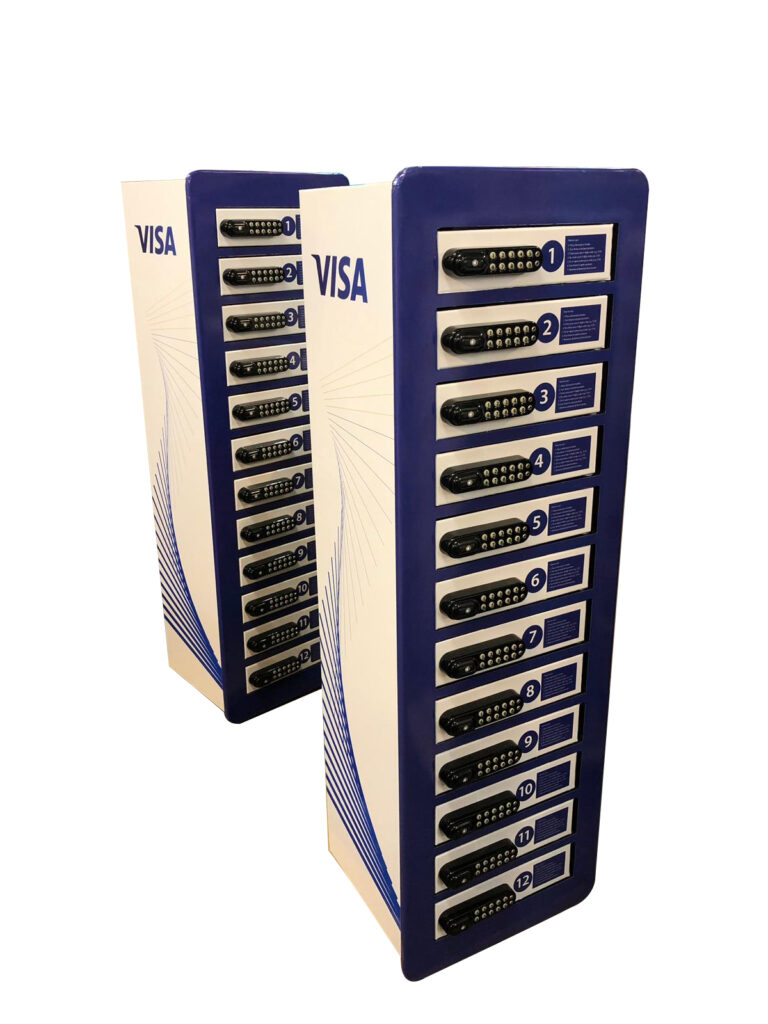
- Cell phone charging locker — a unit divided into individually lockable compartments, each with its own charging connection, so a device charges out of view and out of reach of other users.
- Lockable phone charging station — generally synonymous with a charging locker; the emphasis is on the locking mechanism rather than the cabinet format.
The buying decision, in practice, comes down to a fairly simple question: does your environment need unattended, secured charging, or is attended, open charging good enough? The rest of this guide walks through how to answer that question for your specific venue, what to look for technically and operationally, and what a working example of a commercial charging locker — the Vischarge 12-locker station — actually includes.
Section 1: What Are Cell Phone Charging Lockers?
A cell phone charging locker is a commercial charging station divided into individually secured compartments, each equipped with charging cables, where a user can store and charge a phone without staying next to it.
Physically, a charging locker unit is typically a floor-standing or wall-mounted cabinet containing a bank of individual compartments — commonly configured in counts such as 4, 8, 12, 16, or 24 lockers per unit, depending on the manufacturer and the expected footfall. Each compartment usually includes:
- One or more charging cables (commonly a mix of USB-C, Lightning, and Micro-USB, so both Apple and Android devices are covered without the user needing their own cable)
- A lock — mechanical key, digital keypad, or RFID/card-based, depending on the model
- Enough internal space for a phone (and sometimes a small personal item) to sit safely while charging
- A shared power supply and charging circuit board serving all compartments in the unit
A typical user journey looks like this:
- The user approaches the unit and identifies an available (unlocked/vacant) locker.
- They open the locker — using a physical key, entering a keypad code, or tapping an RFID card/badge, depending on the access method.
- They connect their phone to the cable inside using the matching connector (Lightning, USB-C, or Micro-USB).
- On digital-PIN units, they set their own access code at this point, so only they can reopen that specific locker.
- They close and lock the door, leaving the phone charging unattended.
- They go about their business elsewhere in the venue — shopping, waiting for a flight, attending a session — without needing to babysit the device.
- When ready, they return to the unit.
- They re-enter their PIN (or use their key/card) to unlock the same compartment.
- They retrieve the fully or partially charged phone.
This workflow is the core difference from an open charging station. With an open station, the user either has to remain physically present the entire time (defeating much of the point of “going and doing something else while it charges”) or leave the phone in full view of everyone walking past, which many people are understandably unwilling to do with a $1,000 device. A locker converts charging from a supervised activity into an unattended one, which is what makes it useful in places where people are moving through, not sitting still.
Section 2: Cell Phone Charging Lockers vs. Open Charging Stations
Neither format is universally “better” — the right choice depends on dwell time, supervision, and how much users trust the environment.
| Factor | Charging Locker | Open Charging Station |
|---|---|---|
| Device security | Physically separated, locked compartment | Device typically stays in the user’s hand or in view |
| Unattended charging | Designed for it — user can walk away | Not recommended — device usually needs to stay attended |
| User experience | Slightly more steps (unlock, set code, relock) | Instant — plug in and go |
| Space footprint | Larger footprint per charging point (locker walls, doors) | Compact — cables can be mounted on a small panel |
| Staffing needs | Minimal once access system is set up | Minimal, but higher informal “watch my phone” burden on staff/security |
| Branding surface | Large — doors and side panels | Smaller — usually just a header panel |
| Installation | Similar; both need power and, ideally, anchoring | Similar; both need power and, ideally, anchoring |
| Maintenance | More points of failure (locks, hinges, per-locker cables) | Fewer moving parts |
| Best environments | Airports, stadiums, events, hospitals, hotels — anywhere users leave the area | Cafes, waiting rooms, offices — anywhere users stay seated nearby |
| Cost per charging point | Generally higher, due to locking hardware | Generally lower |
| Scalability | Add units in fixed increments (4, 8, 12, 24 lockers) | Easier to add individual ports incrementally |
| Privacy | High — contents not visible to others | Low — device visible to anyone nearby |
| Liability exposure | Lower theft risk, but locker-specific issues (jammed doors, forgotten PINs) | Higher theft/loss risk if left unattended |
When an open station may be the better fit: environments where people are seated and staying put anyway — a café, a co-working lounge, a waiting room with assigned seating — don’t need the locking mechanism, and a simpler open station is cheaper and faster to use.
When a locker is clearly preferable: anywhere the visitor is expected to move away from the charging point — a conference concourse, an airport gate area, a stadium, a theme park, a hospital where a visitor needs to step into an appointment. In these settings, an open station effectively forces a bad choice between “stand here and wait” or “leave your phone exposed,” and a locker removes that trade-off entirely.
Section 3: Why Businesses Buy Cell Phone Charging Lockers
Organizations invest in charging lockers for a mix of operational and experiential reasons. It’s worth being honest about what’s a reasonably expected benefit and what would be an overreach to promise.
Reasonably expected benefits:
- Visitor/customer satisfaction — offering a secure way to charge a phone removes a genuine point of friction, particularly in venues where people spend hours (airports, hospitals, stadiums, conferences).
- Reduced “watch my phone” burden on staff — front-desk and security staff are frequently asked informally to keep an eye on charging phones at open stations; a locker removes that request entirely.
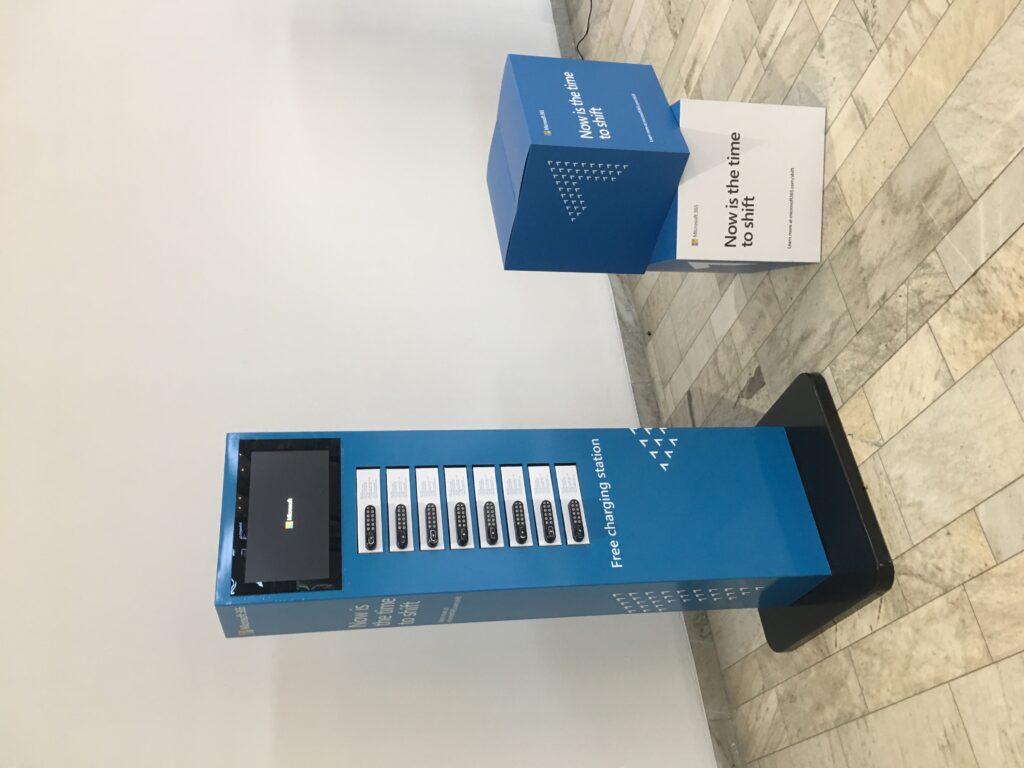
- A branding surface — the locker doors and panels are physical, high-visibility real estate that can carry a logo, sponsor branding, or a promotional message, in a spot where the visitor will look directly at it twice (dropping off and picking up the phone).
- A modest incentive to extend dwell time in retail and hospitality settings, since a charging phone gives someone a practical reason to keep browsing or stay at the venue rather than leaving to find power elsewhere.
Claims to be skeptical of, from any vendor: guaranteed increases in sales, guaranteed increases in dwell time by a specific percentage, or claims that a charging locker “pays for itself” within a fixed period. These outcomes depend heavily on venue type, foot traffic, and how the unit is marketed on-site — they are not a property of the hardware itself, and any specific number should be treated as an unverified estimate rather than an established fact.
Section 4: Who Should Use Cell Phone Charging Lockers?
The following environments are the most common commercial deployments. For each, the core question is the same: do visitors need to walk away from their phone while it charges, and does the environment carry enough foot traffic or dwell time to justify the investment?
Airports and transportation hubs. Long dwell times, security-line separation from gates, and heavy reliance on phones for boarding passes make this one of the strongest use cases. Placement near gate areas and security checkpoints tends to see the highest use.
Hotels and resorts. Lobbies and conference space benefit from lockers, since guests frequently need to leave a charging phone while checking in, attending an event, or using other hotel facilities.
Convention centers and trade shows. High attendee density, short but intense dwell periods, and strong sponsorship potential (branded lockers are a recognizable activation format at trade shows).
Universities and colleges. Student unions, libraries, and large lecture buildings see heavy phone use throughout the day; lockers work well in common areas where students study or socialize away from their bags.
Hospitals and healthcare facilities. Patients and visitors often need to step away from a waiting area into an appointment, procedure, or hospital room — a locker lets them charge without leaving a phone unattended on a waiting-room chair.
Stadiums and arenas. Very high foot traffic concentrated around concourses, with clear peak-demand windows (halftime, intermissions) — a strong candidate for locker deployment, and a strong sponsorship/branding opportunity.
Shopping malls and retail. Charging lockers near food courts or central atriums give shoppers a reason to keep browsing rather than leaving to charge elsewhere.
Libraries. Similar logic to universities — long, quiet dwell times where visitors want their hands free.
Museums and attractions. Guests spend hours moving through exhibits; a locker at the entrance lets them charge a phone during the visit rather than carrying a dying battery through it.
Corporate offices and coworking spaces. Useful in large open-plan environments or visitor/reception areas, though for permanent desk-based staff, an open station is often sufficient since employees stay at their desks anyway.
Restaurants, bars, and entertainment venues. Best suited to venues with longer dwell times or nightlife settings where phones are more likely to leave a table (dance floors, bars) and where a locker offers real security value.
Events and festivals. Charging is one of the most requested amenities at multi-hour outdoor events, and branded lockers are a well-established sponsorship activation.
Government and public buildings. DMV offices, courthouses, and similar high-wait-time public facilities benefit from the same logic as hospitals — long unattended waits.
For lower-dwell-time, seated environments — a small café, a single-desk waiting room, a quiet office where staff stay at their own desk — an open charging station is often the more proportionate and cost-effective choice, and buyers shouldn’t feel pressure to default to a locker for every application.
Section 5: Digital PIN Cell Phone Charging Lockers
This is the access-control layer, and it’s often the single most important spec to get right, because it determines both day-to-day usability and what happens when something goes wrong.
Common access methods:
| Access Method | Advantages | Limitations | Best For |
|---|---|---|---|
| Mechanical key | Simple, no power dependency for the lock itself | Keys can be lost by staff; not self-service for the public | Staff-managed or low-traffic settings |
| Digital keypad (user-set PIN) | Self-service; no key to lose; user sets their own code at drop-off | Users can forget their PIN; needs an admin override process | High-traffic public venues |
| RFID / smart card | Fast tap-to-open; can reuse an existing access card (e.g., staff badge) | Requires the user to have a compatible card; less useful for one-off visitors | Corporate campuses, universities, staff areas |
Forgotten PINs and lost access are the most common real-world support issue with digital-PIN lockers, not theft. Any organization deploying keypad or RFID lockers should have a documented staff override procedure — most commercial units support some form of administrator or master access for exactly this reason — and should post clear, simple instructions at the unit so users understand what to do if they forget their code. This is an operational planning item, not just a hardware spec: buyers should ask their supplier directly how override access works on the specific model they’re purchasing, since this varies by manufacturer and shouldn’t be assumed.
Digital PIN access does not make a locker theft-proof — it secures the compartment from casual access by other members of the public, but a locker’s overall security still depends on the physical build quality of the cabinet, how and where it’s installed, and the surrounding venue’s security posture (cameras, staff visibility, lighting). Treat “digital PIN” as one layer of a broader security picture, not a complete answer on its own.
Section 6: Are Cell Phone Charging Lockers Secure?
The honest answer is: security depends on more than the lock. A locker is “secure storage” in the sense that it removes casual/opportunistic theft risk far more effectively than an open station — but no commercial vendor can honestly promise “guaranteed protection,” and buyers should be wary of any claim that implies otherwise.
What actually determines real-world security:
- Construction quality — the cabinet material and the strength of the hinges/door mechanism.
- Lock quality — a keypad or RFID lock is only as good as its underlying mechanism; ask what happens if the lock loses power or malfunctions.
- Anchoring/installation — an unsecured, freestanding unit can, in principle, be moved or tipped; anchoring to the floor or wall is a standard commercial best practice for any public-facing equipment of this kind.
- Placement — visibility from staffed areas or security cameras meaningfully deters tampering, independent of the lock itself.
- Staff procedures — a documented process for lost PINs, abandoned devices, and end-of-day checks matters as much as the hardware.
- User behavior — no locker prevents a user from sharing their own PIN with someone else, or from placing a device that’s already damaged.
Realistic failure scenarios to plan for, not to alarm buyers but to help them write sensible policies: a user forgets their PIN and needs staff override; a device is left overnight and needs a lost-property process; a phone with an already-damaged battery is placed inside and something goes wrong internally (unrelated to the locker itself); a user disputes whether their device was returned undamaged.
Given the liability questions this can raise, this guide is not legal advice, and organizations should have their own operating policy — including language about device condition, maximum charging duration, and limits on liability — reviewed by appropriate legal or risk-management counsel before deployment, particularly for large public installations.
Section 7: Charging Safety and Electrical Considerations
At a high level, buyers should be aware of the basic safety factors that apply to any multi-device charging equipment, without needing to become electricians themselves:
- Cable and connector quality matters over the life of the unit — frequent public use wears cables faster than personal use, and worn cables/connectors are a common source of slow charging or overheating complaints.
- Ventilation inside a locker compartment matters, since phones (particularly ones with damaged batteries) can generate heat while charging in an enclosed space.
- Circuit loading — a unit charging many devices simultaneously draws meaningful power, and installation should follow the manufacturer’s stated electrical requirements for the circuit it’s connected to.
- Lithium-ion batteries in modern phones are generally safe under normal charging conditions, but any organization deploying charging equipment at scale should have a basic incident policy (what staff do if a device appears to be overheating or smoking) as a matter of ordinary commercial prudence.
This guide does not provide detailed electrical installation instructions. Buyers should verify applicable U.S. electrical requirements, local building codes, and the specific manufacturer’s installation documentation before installing any commercial charging equipment, and should use a qualified electrician for the installation itself where the unit requires a dedicated circuit or hardwired connection.
Section 8: Charging Cable Compatibility
The single most common mistake in procurement is asking the wrong question. “Does it charge phones?” is not specific enough. The right question is: “What devices do our actual visitors carry?”
- USB-C is now standard across most current Android devices and recent iPhone models.
- Lightning remains relevant for older iPhone models still in active use.
- Micro-USB is increasingly rare on current devices but may still be needed for older phones, some accessories, or budget devices.
A unit with multiple cable types per locker (rather than a single fixed connector) offers more flexibility for a general public audience where you can’t predict exactly which devices will show up. Cable durability also belongs in the total-cost-of-ownership conversation, not just the initial spec sheet — heavily used public cables wear out and need periodic replacement, so it’s reasonable to ask a supplier directly what a cable replacement costs and how it’s handled after the initial warranty period.

Cell phone charging lockers
Section 9: How Many Lockers Do You Need?
There’s no universal formula, but a simple capacity-planning framework helps avoid both under- and over-provisioning:
- Estimate daily or peak-hour visitor volume for the specific area where the unit will sit (not the whole venue).
- Estimate the realistic percentage of visitors likely to want to charge a phone at any given time — this varies enormously by venue type and should be treated as a working assumption, not an industry-wide statistic.
- Estimate average charge duration (a partial top-up charge is typically much shorter than a full charge).
- Divide expected simultaneous demand by locker count to check whether a single unit’s capacity is realistic for your peak period.
Illustrative (not statistical) examples, purely to show the logic:
- A 100-visitor boutique retail location with modest, spread-out foot traffic may be adequately served by a single small unit (4–8 lockers), since demand at any one moment is unlikely to be concentrated.
- A 500-visitor conference session break may see a short, sharp spike in demand right after the session ends — a single 12-locker unit near the exit could see all lockers occupied within minutes during that window, even if daily usage otherwise looks modest.
- A 1,000+ visitor trade show floor typically benefits from multiple units spread across different zones rather than one large bank in a single location, since visitors will use whichever unit is closest rather than walking across the floor.
- A 5,000+ attendee stadium or festival environment generally requires multiple 12–24 locker units distributed at different concourse or entrance points, sized around known peak windows (halftime, set breaks) rather than average attendance.
The correct locker count for any specific venue depends on actual, observed usage patterns — where possible, start with a conservative deployment, observe how quickly lockers fill during peak periods, and scale from there rather than guessing at scale from day one.
Section 10: Why a 12-Locker Configuration Is a Common Commercial Choice
A 12-locker unit sits in a useful middle ground for many commercial deployments: it offers meaningfully more simultaneous capacity than a small 4-locker unit, without the larger footprint of a 24-locker installation. It’s a practical fit for venues that see steady, moderate foot traffic — a hotel lobby, a mid-sized retail location, a conference breakout area — rather than the very highest-traffic concourses, which may warrant multiple units or a larger single configuration.
This isn’t a claim that 12 lockers is the optimal count for every environment — Section 9’s capacity-planning framework should drive the actual number for a given venue. It’s simply a common, practical baseline configuration that commercial suppliers, including Vischarge, offer as a standard product.
Section 11: Product Spotlight — Vischarge 12-Locker Cell Phone Charging Station
Vischarge’s 12-locker charging station is one example of a commercial charging-locker configuration built around secure individual compartments. Based on the current U.S. product listing, the confirmed specifications are:
- 12 individual lockers
- 3–6 charging cables per locker, supporting multiple device types
- Digital keypad locks, with an alternative codeless/keyless option using a programmed RFID smart-access card (including the option to use an existing work access card)
- User-generated lock codes — the person using the locker sets their own PIN at the point of use
- Multi-device charging in each compartment
- Customizable and interchangeable graphics, for branding the unit to a business, sponsor, or event
- External dimensions of 495 x 370 x 328mm
- Built for high-traffic commercial environments
- A limited lifetime warranty on the product, with a 10-year service contract as stated by the manufacturer
Why each of these matters in practice:
- Digital PIN / user-generated codes reduce the need for staff to manage physical keys, and let the unit run largely self-service — a meaningful operational advantage in venues without dedicated locker attendants.
- Individual lockers mean multiple people can charge devices at the same time while keeping each device physically separated from the next user, rather than sharing an open bank where devices sit side by side in view of everyone.
- Multiple cable types per locker address the reality that a public venue can’t predict whether the next user carries an iPhone or an Android device — the unit needs to accommodate both without the user bringing their own cable.
- Custom branding turns the unit into more than an electrical amenity — the locker doors are a visible, dwell-time-guaranteed surface (the visitor looks at it at drop-off and pickup) that a business or sponsor can use for logo placement, a promotional message, or a QR code.
- Commercial-grade construction reflects the reality that a unit used dozens or hundreds of times a day in a public space needs to hold up to a different standard than a household charging accessory bought for occasional personal use.
Because listed specifications on the manufacturer’s own pages have varied between describing the unit as “assembled in Europe” and “assembled in the UK,” buyers evaluating this specific model should confirm current country-of-assembly and any other spec they consider material directly with Vischarge before purchasing, rather than relying solely on marketing copy.
Next step: organizations considering this unit for a venue, business, campus, or event can contact Vischarge to request a configuration and quote based on their specific deployment requirements.
Section 12: Buying Cell Phone Charging Lockers in the United States — A Buyer’s Guide
Before ordering, buyers should have clear answers on the following:
- Purchasing model — outright purchase vs. rental (see Section 15).
- Branding — what customization is included, and what the process and turnaround time looks like.
- Shipping — delivery timeframe to your specific location, and whether shipping cost is included or additional.
- Installation — what the buyer is responsible for (power connection, anchoring) vs. what the vendor provides.
- Service and warranty terms — get the specific warranty length and what it covers in writing, rather than relying on homepage marketing language, since these details can vary between a vendor’s own pages.
- Replacement parts — how cable and lock replacements are handled after the initial warranty period, and at what cost.
- Access control — which access method(s) the unit supports (keypad, RFID, key) and whether that can be changed later.
- Physical footprint and installation type — floor-standing, wall-mounted, or tabletop, and whether your intended location can accommodate the unit’s actual dimensions and power requirements.
Section 13: What Does a Cell Phone Charging Locker Cost?
Vischarge’s U.S. site does not consistently display reliable, current list pricing for its 12-locker unit at the time of this guide’s writing (the product page pricing field showed $0.00, alongside sale pricing shown on related smaller units). Rather than presenting a specific number that may be inaccurate by the time this is read, buyers should request a current, written quote directly and evaluate pricing against the following cost drivers, which apply across the commercial charging-locker market generally:
- Number of lockers in the unit
- Build quality/materials of the cabinet
- Locking system type (mechanical key vs. digital keypad vs. RFID)
- Cable count and type per locker
- Level of custom branding requested
- Installation complexity and location
- Shipping distance and method
- Any ongoing service agreement included or purchased separately
- Order volume (multi-unit institutional orders vs. a single unit)
Any specific price mentioned by a vendor — including in a “limited time” or “sale” format — should be confirmed directly and in writing as part of a formal quote before purchase, since promotional pricing on any vendor’s site can change.
Section 14: Total Cost of Ownership
The purchase price is only one line item. A realistic total-cost picture over the unit’s useful life includes:
- Initial purchase price
- Shipping and delivery
- Installation labor (electrician, anchoring, any facility work)
- Ongoing electricity cost (modest, but non-zero for continuous operation)
- Routine maintenance and cleaning
- Replacement cables over time, given heavy public use
- Replacement locks or lock components if they fail
- Any paid service agreement beyond an included warranty period
- Rebranding/graphics replacement if branding needs change (e.g., a sponsor changes)
- Staff time for administration (PIN resets, lost-property handling)
A lower sticker price on a unit with cheaper components can end up costing more over several years if cables and locks need frequent replacement — buyers evaluating multiple vendors should ask directly about expected cable/lock lifespan under heavy public use, not just the headline price.
Section 15: Buy vs. Rent Cell Phone Charging Lockers
| Best for | |
|---|---|
| Purchasing outright | Organizations with recurring, ongoing need — a permanent venue, hotel, hospital, or office where the unit will be in continuous use |
| Short-term event rental | A single event, conference, or festival with a defined start and end date |
| Long-term rental (e.g., 6–24 months) | Organizations that want charging infrastructure without a large upfront capital purchase, or that expect their needs to change |
For organizations expecting recurring, ongoing usage — a venue that operates year-round, a hotel, a hospital — outright ownership generally makes more financial sense over a multi-year horizon than repeated rental fees, since the equipment is being used continuously rather than for isolated events. Rental remains a legitimate and often more sensible choice for one-off events or organizations still testing whether charging infrastructure is worth a permanent investment — there’s no need to default to purchasing if your actual usage pattern is closer to occasional.
Section 16: Custom-Branded Cell Phone Charging Lockers
Branding on a charging locker typically involves customizing the visible door and side-panel graphics with a business’s logo, colors, a sponsor’s branding, or event-specific artwork. Because a user looks directly at the unit twice — once when dropping the phone off, once when returning to retrieve it — the locker functions as a physical touchpoint with guaranteed, if brief, visual attention, which is different from passive signage that visitors may simply walk past.
Common branding applications include:
- A business’s own logo and colors, presented as a customer amenity
- Sponsor branding at an event or conference, sold as part of a sponsorship package
- Campaign-specific graphics tied to a promotion or product launch
- QR codes linking to a website, offer, or social channel
Buyers should treat branding lead time and turnaround as a real procurement variable — ask directly how long custom graphics take to produce and whether reprinting/rebranding later (for example, when a sponsor changes) is offered and at what cost.
Section 17: Charging Lockers as a Branding and Sponsorship Asset
For event organizers specifically, charging infrastructure has become a recognized sponsorship category, alongside more traditional signage and stage branding. The appeal for a sponsor is straightforward: the charging locker offers genuine utility to attendees (rather than being pure advertising), which tends to generate more goodwill than passive branding, combined with guaranteed dwell time at drop-off and pickup and repeat exposure if the same attendee returns to the unit multiple times during a multi-day event.
As with the dwell-time and sales claims discussed in Section 3, organizers should avoid promising sponsors specific conversion numbers or ROI percentages that haven’t been independently measured at their own event — the honest pitch is “guaranteed attendee attention at a useful touchpoint,” not a guaranteed sales outcome.
Section 18: How to Choose a Commercial Cell Phone Charging Locker — Checklist
- Number of lockers needed (see Section 9’s capacity framework)
- Locker interior dimensions (does it fit larger phones/cases?)
- Device compatibility — which connectors are included
- Cable count per locker
- Lock type — keypad, RFID, or key
- Self-service PIN functionality
- RFID/badge support, if relevant to your environment
- Administrator/override access process
- Cabinet construction and build quality
- Installation requirements (power, anchoring)
- Anchoring/security of the unit itself
- Branding and customization options
- Warranty terms, in writing
- Ongoing service/support terms
- Replacement parts availability and cost
- Maintenance requirements
- Accessibility of controls and reach ranges (see Section 21)
- Expected venue traffic and peak demand
- Power requirements for your installation site
- Realistic total cost of ownership, not just sticker price
- Vendor responsiveness and support reputation
- Ability to customize or reconfigure later
Section 19: Questions to Ask a Phone Charging Locker Supplier
- How many devices can charge simultaneously in one unit?
- Which connector types are included in each locker?
- Can users generate their own PIN, or is access preset?
- Is there an administrator override for forgotten PINs — and how does it work?
- What is the process if a user forgets their PIN and staff aren’t immediately available?
- Can the unit be branded, and what is the turnaround time?
- What exactly does the warranty cover, and for how long — in writing?
- What ongoing service is available after the warranty period?
- Are replacement cables and locks available, and at what cost?
- What are the electrical and installation requirements?
- What are the confirmed exterior and interior dimensions?
- What is the recommended placement (power access, anchoring, clearance)?
- Is the unit rated or designed for high-traffic commercial use?
- What happens if an individual locker’s lock fails — can it be serviced without taking the whole unit offline?
- What is the country of origin/assembly, confirmed directly rather than from marketing copy?
- What is the actual current price, in writing, rather than a promotional homepage figure?

Section 20: Installation and Placement Guide
Good placement is as important as the unit itself. General principles:
- High-visibility, high-traffic locations — entrances, reception areas, waiting areas, lounges, concourses, near food courts or customer-service desks — perform better than tucked-away corners, both for usage and for security (visibility deters tampering).
- Proximity to power — confirm the unit’s power requirements match what’s available at the intended location before committing to a spot.
- Staff visibility and camera coverage — placing the unit within sight of staffed areas or security cameras adds a meaningful layer of informal security.
- Clearance and accessibility — leave enough floor space for wheelchair users and general foot traffic to access the unit without creating a bottleneck.
- Evacuation routes — don’t place any large fixed unit in a way that could obstruct an emergency exit path.
Buyers should verify all placement decisions against local building codes, fire codes, and accessibility requirements for their specific facility — this guide provides general orientation, not a code determination for any particular building.
Section 21: ADA and Accessibility Considerations
At a high level, organizations installing public charging equipment in the U.S. should evaluate the installed configuration against the U.S. Access Board’s ADA Accessibility Guidelines, which address factors such as reach ranges for operable controls and required clear floor space in front of equipment. These are general, well-established categories of accessibility requirement — but the specific compliance determination depends on the exact unit, its mounting height, and its installation context.
No specific installation should be assumed ADA-compliant based on manufacturer marketing alone. Organizations should evaluate their final installed configuration against applicable accessibility requirements and consult appropriate professional or legal guidance where necessary, particularly for large public-facing deployments.
Section 22: Sample Operating Policy Framework (Not Legal Advice)
Organizations deploying public charging lockers benefit from a simple, posted policy. A reasonable framework to adapt covers:
- User responsibility — the user is responsible for the condition of their own device
- Prohibited items — no charging of devices with visibly damaged batteries or casings
- Maximum charging duration — a stated time limit, after which the venue reserves the right to open the locker
- Abandoned devices — a defined lost-property process and holding period
- Forgotten PINs — a clear, posted process for staff-assisted access
- Damaged devices — a statement of the venue’s role and limits of responsibility
- Emergency access — how staff can open a locker in an emergency
- Staff access procedures — who is authorized to use administrator override, and how that’s logged
- Contact information — how a user reaches support if something goes wrong
This is offered as a starting template only, not legal advice. Any organization deploying public charging infrastructure at scale should have its actual policy reviewed by appropriate legal counsel for its jurisdiction and specific liability exposure.
Section 23: Common Problems With Charging Lockers (and How to Mitigate Them)
Being upfront about what can go wrong is part of making a good buying decision — no vendor’s product avoids all of these entirely.
- Forgotten PINs — mitigate with clear signage, a documented staff override process, and simple user instructions.
- Damaged charging cables from heavy public use — mitigate by asking suppliers about replacement cost/process up front and budgeting for periodic replacement.
- Users leaving devices too long — mitigate with a posted maximum-duration policy and periodic staff checks during off-peak hours.
- Devices with pre-existing battery damage — mitigate with posted rules against charging visibly damaged devices, and staff training to recognize warning signs.
- Locker door or lock jams — mitigate by choosing a vendor with responsive parts/service support, and having a documented process for temporarily taking a single locker out of service without disabling the whole unit.
- Power outages — mitigate with clear signage about what happens to locked devices during an outage, and staff training on manual/emergency access.
- Incompatible devices (tablets, larger phones with bulky cases) — mitigate by confirming locker interior dimensions match your visitor base before purchase.
- Unrealistic user expectations that staff will guarantee device safety — mitigate with clear posted policy language (Section 22) set at deployment, not after an incident.
- Insufficient capacity at peak times — mitigate using the capacity-planning approach in Section 9, and plan to scale based on observed demand.
- Poor placement reducing usage — mitigate using the placement principles in Section 20.
- Missing or unclear signage — mitigate with simple, illustrated instructions posted directly on the unit.
- Deferred maintenance — mitigate by assigning clear internal ownership of the unit (who checks it, how often) rather than treating it as “set and forget” equipment.

Section 24: Cell Phone Charging Lockers vs. Power Banks
| Best for | |
|---|---|
| Charging locker | Venues where users need to leave the immediate area while charging |
| Portable power bank / power-bank rental kiosk | Venues where users want to keep their phone with them while it charges (walking around a festival, staying mobile) |
| Open charging station | Venues where users are staying seated nearby anyway |
| Wall outlet only | Very low-traffic settings where dedicated equipment isn’t justified |
Some venues genuinely benefit from letting users keep their phone in hand while it charges via a rented power bank, rather than leaving it behind — festivals and large outdoor events are a common example. Charging lockers, by contrast, are the better fit specifically where secure, unattended charging is the priority and the user is comfortable stepping away from the device entirely.
Section 25: Cell Phone Charging Lockers vs. Charging Kiosks — Clarifying the Terms
These terms are frequently used inconsistently across the market, which makes comparison shopping harder than it should be:
- Charging station — a general term covering any dedicated charging equipment, locking or not.
- Charging kiosk — usually implies a self-contained, freestanding unit; may or may not include individual lockers.
- Charging locker / power locker — specifically implies individually lockable compartments.
- Mobile charging station — sometimes refers to a portable/wheeled unit rather than a fixed installation; confirm with the vendor which they mean.
- Secure charging station — a marketing term that should prompt a follow-up question: secure how — individual lockers, or just a supervised location?
When comparing vendors, don’t rely on the product name alone — confirm directly whether the unit includes individually locking compartments or is an open format, since vendors don’t always use these terms consistently.
Section 26: U.S. Market Considerations
Buyers purchasing in the United States should keep a few practical points in mind:
- Electrical requirements can vary by state and municipality — confirm local code requirements with a licensed electrician before installation, particularly for hardwired or high-draw installations.
- Accessibility requirements apply at the federal level (ADA) but installation specifics should be checked against your building’s requirements.
- Shipping timeframes vary by vendor and by how far the delivery address is from the vendor’s fulfillment location — get a specific, written estimate rather than relying on general marketing claims of fast delivery.
- Institutional procurement — universities, hospitals, and government facilities often have their own vendor-approval and purchasing processes; confirm the vendor can accommodate your organization’s specific procurement requirements (POs, net payment terms, insurance certificates) before finalizing a decision.
- Multi-location deployments — organizations buying for several sites should ask about consistent lead times and support across all delivery locations, not just the first unit.
Requirements can vary meaningfully by state, municipality, and specific building — this guide does not substitute for confirming applicable local requirements directly.
Section 27: International Applications
While this guide focuses on U.S. deployment, the same core commercial logic — secure, unattended, brandable charging — applies internationally, and several vendors, including Vischarge, serve customers outside the U.S. as well. Organizations with international locations should confirm separately what electrical standards, plug types, and local support are available in each specific country, since these details are not interchangeable with U.S. requirements.
Section 28: How to Buy a Vischarge Cell Phone Charging Locker
- Determine the required locker capacity for your specific location, using the framework in Section 9.
- Choose a locker configuration (e.g., 12-locker vs. other available counts).
- Choose an access method — digital keypad, RFID/card, or a combination.
- Confirm the cable/connector configuration matches your expected visitor devices.
- Determine your branding requirements and expected turnaround.
- Confirm installation requirements against your intended location (power, floor space, anchoring).
- Request a written quote directly from Vischarge (contact: sales@vischarge.us) covering price, shipping, and service terms.
- Review all commercial terms — including warranty length and what it covers — in writing before ordering.
- Place the order.
- Coordinate installation, including any required electrical work.
- Launch the unit with posted signage and staff-facing instructions (see Section 22).
- Maintain the unit on an ongoing basis — assign clear internal ownership for checks, cable replacement, and PIN-reset support.
Next step: organizations ready to move forward can contact Vischarge directly to request a configuration and quote for a specific venue, business, campus, or event.
Section 29: Vischarge 12-Locker Product Checklist
| Feature | What it means for the buyer |
|---|---|
| 12 individual lockers | Multiple visitors can charge simultaneously, each in a separate secured compartment |
| 3–6 charging cables per locker | Reduces the chance a visitor’s device isn’t compatible with the unit |
| Digital keypad or RFID/card access | Self-service operation without requiring staff to manage physical keys |
| User-generated lock codes | The visitor controls their own access code at the point of use |
| Customizable/interchangeable graphics | The unit can be branded to a business, sponsor, or event and rebranded later |
| Designed for high-traffic use | Built to a commercial rather than consumer-grade standard |
| Limited lifetime product warranty; 10-year service contract as stated by manufacturer | Confirm exact current terms directly with Vischarge in writing before purchase |
Frequently Asked Questions cell phone charging lockers
What are cell phone charging lockers? Cell phone charging lockers are commercial charging stations divided into individually secured compartments, allowing a user to charge a phone without staying next to it or leaving it in view of other visitors.
Are cell phone charging lockers secure? They significantly reduce casual theft risk compared to open charging stations, since each device sits in a locked compartment. However, overall security also depends on cabinet build quality, installation, placement, and venue security — no vendor can honestly promise absolute protection.
How do phone charging lockers work? A user selects an open locker, connects their phone to the cable inside, sets or enters an access code (or uses a key/RFID card), and locks the compartment. They can then leave and return later to unlock the same locker and retrieve the device.
How much do charging lockers cost? Pricing depends on locker count, build quality, lock type, cable configuration, branding, installation, and shipping. Buyers should request a current written quote directly from the vendor rather than relying on promotional homepage pricing.
Where can I buy cell phone charging lockers in the USA? Several commercial suppliers serve the U.S. market, including Vischarge, which sells a 12-locker digital-PIN configuration directly to businesses, venues, and institutions.
What is a digital PIN charging locker? A locker where the user sets their own numeric access code at the point of use, rather than relying on a physical key, allowing self-service operation.
Can users create their own PIN? On digital-keypad models like the Vischarge 12-locker unit, yes — the lock codes are user-generated at the time of use.
What happens if a user forgets their PIN? This is the most common real-world support issue with keypad lockers. Organizations should confirm with their supplier how administrator/override access works, and should post clear instructions and staff contact information at the unit.
Can charging lockers charge iPhones? Yes — units with Lightning and/or USB-C cables (depending on iPhone model) support charging, provided the locker includes the relevant connector.
Can charging lockers charge Android phones? Yes — most current Android devices use USB-C, which is commonly included in multi-cable commercial lockers.
Do charging lockers support USB-C? Commercial units with multiple cables per locker typically include USB-C alongside Lightning and/or Micro-USB, but buyers should confirm the specific connector mix with their supplier.
Do charging lockers support Lightning? Many commercial units include a Lightning cable option to support iPhone models that use that connector — confirm with your supplier for the specific unit.
Can charging lockers be branded? Yes — most commercial lockers, including Vischarge’s, offer customizable or interchangeable graphics on the doors and panels for logo, sponsor, or campaign branding.
How many lockers should a business buy? There’s no universal number — it depends on expected peak simultaneous demand at the specific location. See the capacity-planning framework in this guide for a practical starting approach.
Are charging lockers suitable for airports? Yes — long dwell times and heavy reliance on phones for boarding passes make airports one of the strongest use cases for secured, unattended charging.
Are charging lockers suitable for universities? Yes — student unions, libraries, and common areas typically see steady phone-charging demand throughout the day.
Are charging lockers suitable for libraries? Yes — the long, quiet dwell times typical of library visits are well suited to unattended locker charging.
Are charging lockers suitable for hospitals? Yes — patients and visitors frequently need to leave a waiting area for an appointment or procedure, making secured unattended charging valuable.
Can charging lockers be wall mounted? Some models offer wall-mounted, tabletop, or floor-standing options — confirm which configurations a specific model supports with the manufacturer.
Can charging lockers be floor standing? Yes — floor-standing is a common configuration for higher-capacity units, including 12-locker and larger models.
Can charging lockers charge tablets? Compatibility depends on the locker’s interior dimensions and cable type — confirm with the supplier if tablet charging is a specific requirement, since locker interiors are typically sized primarily for phones.
Can charging lockers charge smartwatches? Some units may accommodate them if a compatible charging cable/connector is included, but this isn’t universal — confirm directly with the supplier if this is a requirement.
Are charging lockers better than open charging stations? Neither is universally better — lockers suit environments where users leave the area while charging; open stations suit environments where users stay seated nearby.
Should I buy or rent a charging locker? Ongoing, permanent venues generally benefit from outright purchase over time; single events or short-term needs are usually better served by rental.
What should I look for in a charging locker? Locker count, cable compatibility, access method, build quality, branding options, warranty terms in writing, and realistic total cost of ownership — see the full checklist in this guide.
Are charging lockers ADA compliant? Compliance depends on the specific installed configuration, including mounting height and clear floor space — it should never be assumed from manufacturer marketing alone. Evaluate the final installation against applicable accessibility requirements.
How should charging lockers be installed? Installation should follow the manufacturer’s electrical requirements and be confirmed against local building codes; anchoring the unit is standard commercial best practice.
What happens during a power outage? This varies by unit and lock type — confirm directly with your supplier what happens to locked compartments during a power loss, and have a documented manual-access procedure for staff.
How are charging locker cables replaced? Ask your supplier directly about their process and cost for cable replacement after the initial warranty period, since heavy public use wears cables faster than personal use.
Can charging lockers be used outdoors? Not all commercial models are rated for outdoor/weather exposure — confirm this specifically with the manufacturer if outdoor deployment is planned.
How should charging lockers be cleaned? Routine wipe-down of exterior surfaces and interior compartments as part of regular facility cleaning is standard; follow the manufacturer’s specific care instructions.
Can a charging locker be used for sponsorship? Yes — branded lockers are an established sponsorship format at events and trade shows, offering genuine attendee utility alongside brand visibility.
Can charging lockers display branding? Yes — doors and side panels are commonly used for logo, sponsor, or campaign graphics.
Are charging lockers worth buying? For venues with meaningful foot traffic where visitors need to leave a charging phone unattended, the security and experience benefits are generally well established. For low-traffic, seated environments, a simpler open station may be more proportionate.
What is the difference between a charging locker and a charging kiosk? “Kiosk” is often used generically for any self-contained charging unit and doesn’t necessarily imply locking compartments — always confirm directly whether a specific product includes individual locks.
What is a secure phone charging station? This term is used inconsistently across vendors — confirm whether “secure” refers to individually locking compartments or simply a supervised/staffed location.
What is the best number of lockers for an event? It depends on expected peak simultaneous demand — see the capacity-planning examples in this guide, and consider multiple smaller units spread across zones rather than one large bank for big venues.
Can charging lockers be used in hotels? Yes — lobbies and conference areas are common and effective placements.
Can charging lockers be used in offices? Yes, particularly in reception/visitor areas; for permanent desk-based staff, an open station at each desk is often unnecessary since employees aren’t leaving their phones unattended.
Can charging lockers be used in malls? Yes — placement near food courts or central atriums is common and tends to encourage extended browsing time.
What should a charging locker user policy include? User responsibility for device condition, prohibited items, a maximum charging duration, an abandoned-device process, a forgotten-PIN process, and clear contact information — see the sample framework in this guide (not legal advice).
Buyer’s Checklist: Before You Buy Cell Phone Charging Lockers
- Confirmed capacity needed based on actual or estimated peak demand
- Confirmed device/cable compatibility matches your visitor base
- Confirmed access method (keypad, RFID, key) fits your operational model
- Confirmed override/lost-PIN process with the supplier
- Confirmed cabinet build quality is rated for your traffic level
- Confirmed installation requirements against your intended location
- Confirmed accessibility of the planned installation
- Confirmed branding options and turnaround time
- Got exact warranty terms in writing
- Got exact service/support terms in writing
- Confirmed replacement-part availability and cost
- Calculated realistic total cost of ownership, not just sticker price
- Checked vendor responsiveness and support reputation directly
- Confirmed the unit’s ability to be reconfigured or rebranded later
- Got current, written pricing — not a promotional homepage figure
Cell phone charging lockers Buying Advice
A good commercial charging locker is not simply a cabinet with cables inside it. The strongest solutions balance secure storage, reliable multi-device charging, self-service access, durable construction, realistic maintainability, adequate capacity for actual peak demand, accessible installation, an effective branding surface, responsive vendor support, and a total cost of ownership that holds up over several years of public use — not just an attractive upfront price.
Vischarge’s 12-locker station is one example of a configuration built around these principles: individually secured compartments, self-service digital-PIN or RFID access, multi-device cable support, and a customizable branding surface. Organizations evaluating this or any commercial charging locker should compare it against other available options using the checklist in this guide, confirm every material specification and cost term in writing, and request a configuration and quote based on their own specific venue, traffic, and branding requirements.
Need a secure charging solution for your venue, business, campus, or event? Contact Vischarge (sales@vischarge.us) to request a configuration and quote for a 12-locker cell phone charging station based on your specific requirements.